 Skip to main content

A compact printer can still leave employees waiting on slow jobs or manually turning pages to scan the other side. For teams that handle paperwork throughout the day, speed and document handling matter.
The Xerox C303a addresses those needs with color printing, copying, scanning, and faxing in an A4 desktop design. It combines faster output with single-pass two-sided scanning, wireless connectivity, and tools intended to simplify setup and daily management.
As a Xerox partner with more than 40 years of office equipment experience, we understand that no printer fits every business. This review covers the C303a’s specifications, features, limitations, cost, and ideal users.
Table of Contents
- Short Answer: Is the Xerox C303a a Good Printer?
- What Is the Xerox C303a?
- Xerox C303a Specifications
- Xerox C303a Key Features
- Xerox C303a Pros and Cons
- How Much Does the Xerox C303a Cost?
- Who Should Buy the Xerox C303a?
- Is the Xerox C303a Worth It?
- FAQ
- Find the Right Printer for Your Office
Short Answer: Is the Xerox C303a a Good Printer?
The Xerox C303a is a capable color multifunction printer for small teams that regularly print and scan. It offers 32 ppm printing, single-pass duplex scanning, standard Wi-Fi, and expandable paper capacity. Its 2.8-inch screen, A4-only format, and 5,000-page recommended monthly volume may limit its usefulness in larger or busier departments.
What Is the Xerox C303a?
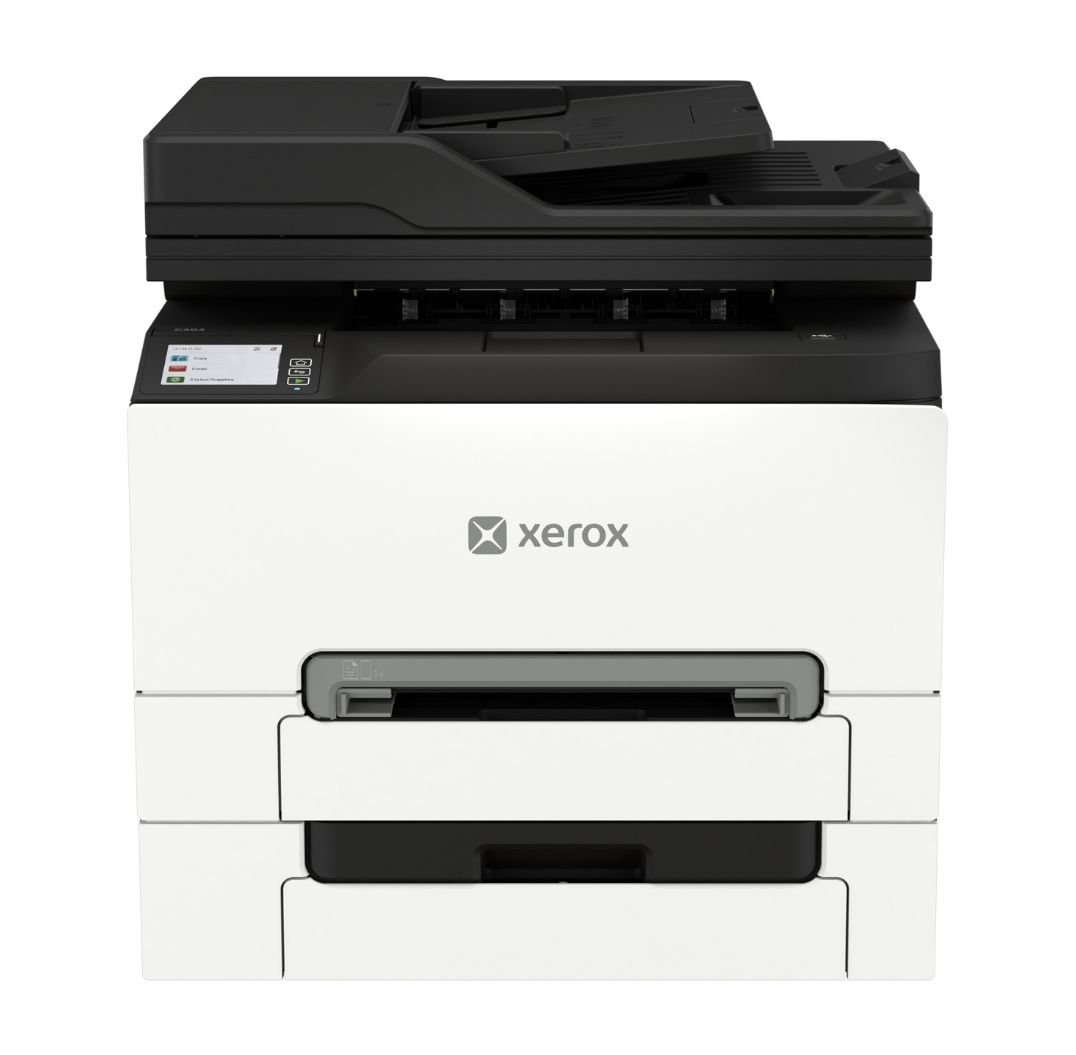
The Xerox C303a is an A4 color multifunction printer built for small and midsized workgroups, branch offices, and hybrid workplaces. It can print, copy, scan, and fax letter- and legal-size documents.
The device prints color and black-and-white pages at up to 32 pages per minute. Its 50-sheet single-pass duplex feeder scans both sides simultaneously, making it useful for contracts, applications, and other two-sided documents.
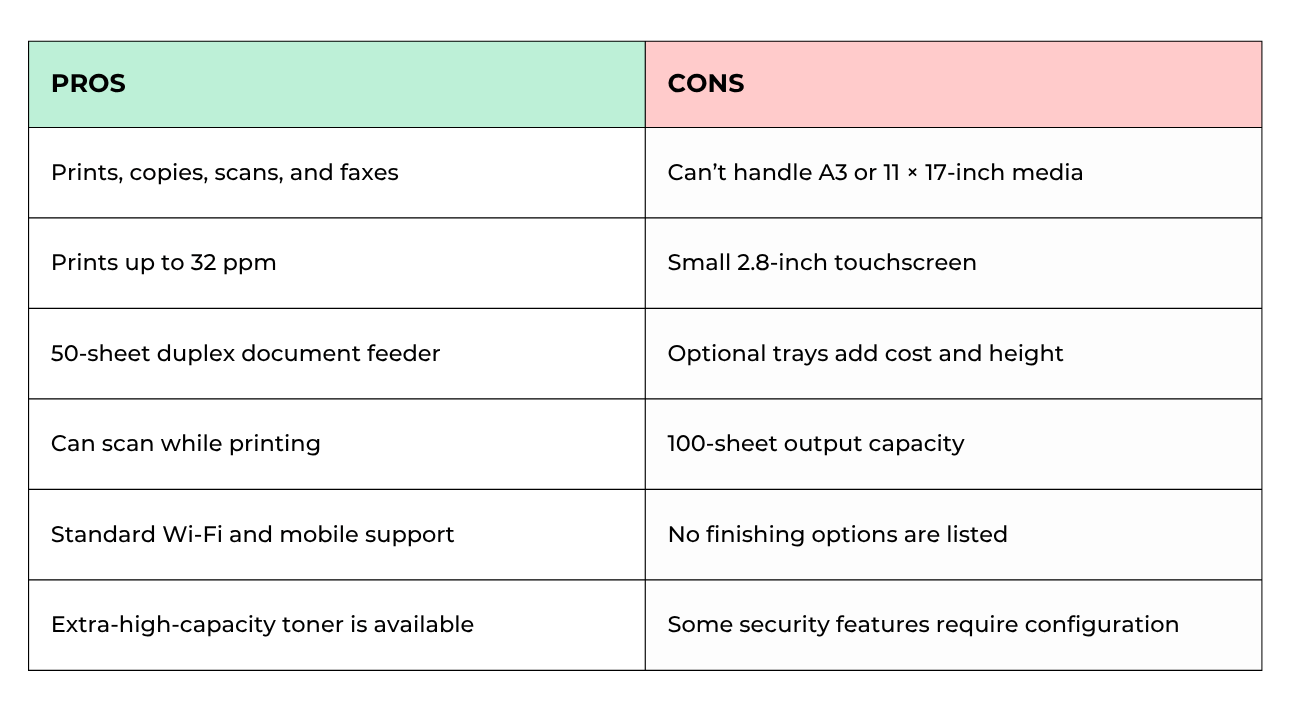
Because it’s an A4 device, the C303a can’t print A3 or 11 × 17-inch media. It’s intended for everyday office documents rather than oversized materials or production work.
Xerox C303a Specifications
- Print speed: Up to 32 ppm letter and 30 ppm A4 in color and black-and-white
- Print resolution: 2400 × 600 dpi
- Recommended monthly print volume: Up to 5,000 pages
- Monthly duty cycle: Up to 75,000 pages
- Connectivity: High-speed USB 2.0, Gigabit Ethernet, Wi-Fi, Wi-Fi Direct, Apple AirPrint, and Mopria
- Dimensions: 2 × 15.7 × 13.6 inches (W × D × H)
- Weight: 6 pounds
Xerox C303a Key Features
Faster Printing and Two-Sided Scanning
The C303a prints up to 32 pages per minute, with a first page out in as little as 8.3 seconds for black-and-white and 8.6 seconds for color. It’s fast enough for a small group producing frequent reports, forms, and customer documents.
Its 50-sheet document feeder is a big productivity advantage for scan-heavy offices. It scans up to 48 letter-size black-and-white pages per minute in simplex mode and up to 96 images per minute in duplex mode. Color scanning reaches up to 21 pages per minute simplex or 42 images per minute duplex.
The device can also scan while another job is printing, so employees can digitize paperwork without waiting for a colleague’s print job to finish.
Straightforward Controls and Digital Workflows
The 2.8-inch color touchscreen lets users print, copy, scan, and fax. The interface is easy to navigate for routine work, although the screen may feel small when entering email addresses or adjusting detailed scan settings.
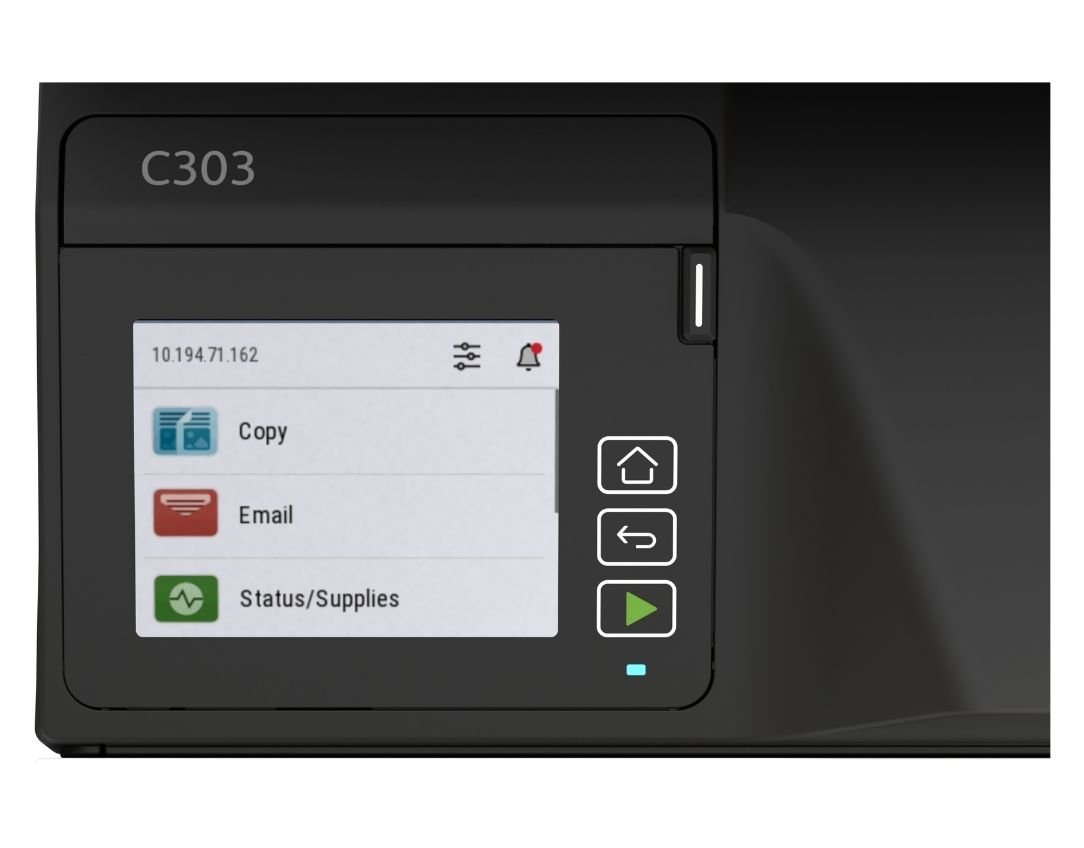
The Xerox Easy Assist App guides setup and lets users monitor supplies, manage passwords, and reach support from a phone. The Xerox Print and Scan Experience App provides scanning, preview, editing, and distribution tools.
The app can also straighten scanned pages, remove blanks, and create searchable PDFs. Optional Xerox Workflow Central services extend these capabilities with tools for translation, redaction, summarization, file conversion, and other document processes.
Scans can be sent to email, USB, FTP, a network folder, or a connected computer. Built-in faxing includes an address book, broadcast sending, junk fax filtering, and forwarding to destinations such as email or a network folder.
Expandable Paper Handling and Mobile Access
The C303a includes a 250-sheet tray and one-sheet manual feed slot. Two optional trays raise maximum input to 751 sheets, reducing refills and keeping different media loaded.
Automatic two-sided printing comes standard. Supported media include envelopes, labels, cardstock, glossy paper, letterhead, and recycled paper in sizes up to 8.5 × 14 inches. The 100-sheet output tray may fill quickly during longer jobs, and the printer does not offer stapling or other finishing.
Wi-Fi and Wi-Fi Direct come standard, giving offices more freedom to place the device. Users can also connect through Ethernet or USB and print from compatible mobile devices with Apple AirPrint or Mopria.
Security and Sustainability
The C303a includes security features such as:
- Digitally signed firmware
- Certificate management
- Access controls
- Confidential Print
- Protected USB ports
- Audit logging
- Non-volatile memory wipe.
Confidential Print holds a job until the user releases it, helping prevent sensitive pages from sitting unattended. Advanced protections may need IT configuration before they provide their full benefit.
More than 50% of the printer’s plastic content comes from post-consumer recycled material. The C303a also has energy-saving modes, ENERGY STAR certification, and EPEAT registration. Eligible cartridges can be returned through the Xerox Cartridge Collection Program where available.
Xerox C303a Pros and Cons
How Much Does the Xerox C303a Cost?
The Xerox C303a has a regular starting price of approximately $499.
However, this doesn’t include other costs such as toner, optional trays, a 128 GB Intelligent Storage Drive, a stand or cabinet, service coverage, and paid workflow services.
The included cartridges yield approximately 1,300 black pages and 1,200 pages per color. Extra-high-capacity cartridges yield up to 6,200 black pages and 6,400 pages for each color. Actual results depend on coverage, document type, and print settings.
Who Should Buy the Xerox C303a?
The C303a may work well for:
- Small teams that need print, copy, scan, and fax functions
- Offices that regularly scan two-sided documents
- Workgroups producing up to approximately 5,000 pages per month
- Healthcare, legal, financial, and administrative offices
- Hybrid or branch locations that need wireless connectivity
- Businesses that want expandable paper capacity
It may not be suitable for:
- High-volume departments
- Offices that require A3 or 11 × 17-inch output
- Teams that need a large touchscreen
- Businesses requiring stapling or other finishing
- Organizations producing specialized color materials
- Workplaces that rarely scan, copy, or fax
Is the Xerox C303a Worth It?
The Xerox C303a is worth considering for a small workgroup that needs efficient two-sided scanning and faster color output in one compact device. Its mobile tools, scan destinations, and expandable paper capacity give it enough flexibility for many everyday business workflows.
Its limits are equally important. A 5,000-page recommended monthly volume, 100-sheet output tray, and lack of finishing make it a poor choice for a busy centralized department. The small display may also feel restrictive to employees who configure complex jobs directly at the printer.
Check out our reviews of the other similar models in the C-Series:
FAQ
Does the Xerox C303a scan both sides automatically?
Yes. Its single-pass duplex document feeder captures both sides of a page at the same time.
What functions does the Xerox C303a include?
The C303a prints, copies, scans, and faxes in color and black-and-white.
Can the Xerox C303a print double-sided?
Yes. Automatic two-sided printing comes standard on compatible media.
How much paper does the Xerox C303a hold?
It holds 251 sheets as standard. Two optional trays increase the maximum input to 751 sheets.
How many pages can the Xerox C303a print per month?
Xerox recommends up to 5,000 pages per month. The 75,000-page duty cycle represents a peak maximum rather than a regular target.
Find a Printer That Fits the Way You Work
The Xerox C303a can be a practical choice for small teams that need to move quickly between printing and digital documents. Its duplex scanner is particularly valuable when an office handles two-sided paperwork regularly.
Before deciding, consider your monthly volume, document sizes, scanning habits, and expected growth. Our Product Configurator can help you narrow down Xerox printers based on the specifications and features your workplace needs.
If you want help evaluating the options, contact our team. We can help you choose a printer with enough capacity for your current work without paying for features your office will not use.
