 Skip to main content


A small office printer is nice until your print volume grows and it starts to produce slow output or requires constant paper refills. Frequent printing demands more than a basic personal device.
The Xerox C300 fills that middle ground. It’s a single-function A4 color printer for small and midsized teams that need faster output, flexible connectivity, and professional color. It does not copy or scan, which limits who will benefit from it.
As a Xerox partner with more than 40 years of office equipment experience, we know that specifications only matter when they match the workplace. This review covers the C300’s features, drawbacks, cost, and ideal users.
Table of Contents
- Short Answer: Is the Xerox C300 a Good Printer?
- What Is the Xerox C300?
- Xerox C300 Specifications
- Xerox C300 Key Features
- Xerox C300 Pros and Cons
- How Much Does the Xerox C300 Cost?
- Who Is the Xerox C300 Best For?
- Is the Xerox C300 Worth Buying?
- FAQ
- Find the Right Printer for Your Office
Short Answer: Is the Xerox C300 a Good Printer?
The Xerox C300 is a good option for small workgroups that need fast, dependable color printing but do not need scanning or copying. It prints up to 32 pages per minute, supports standard Wi-Fi, and can hold up to 751 sheets with optional trays. Its A4 format and print-only design make it less suitable for broader document workflows.
What Is the Xerox C300?
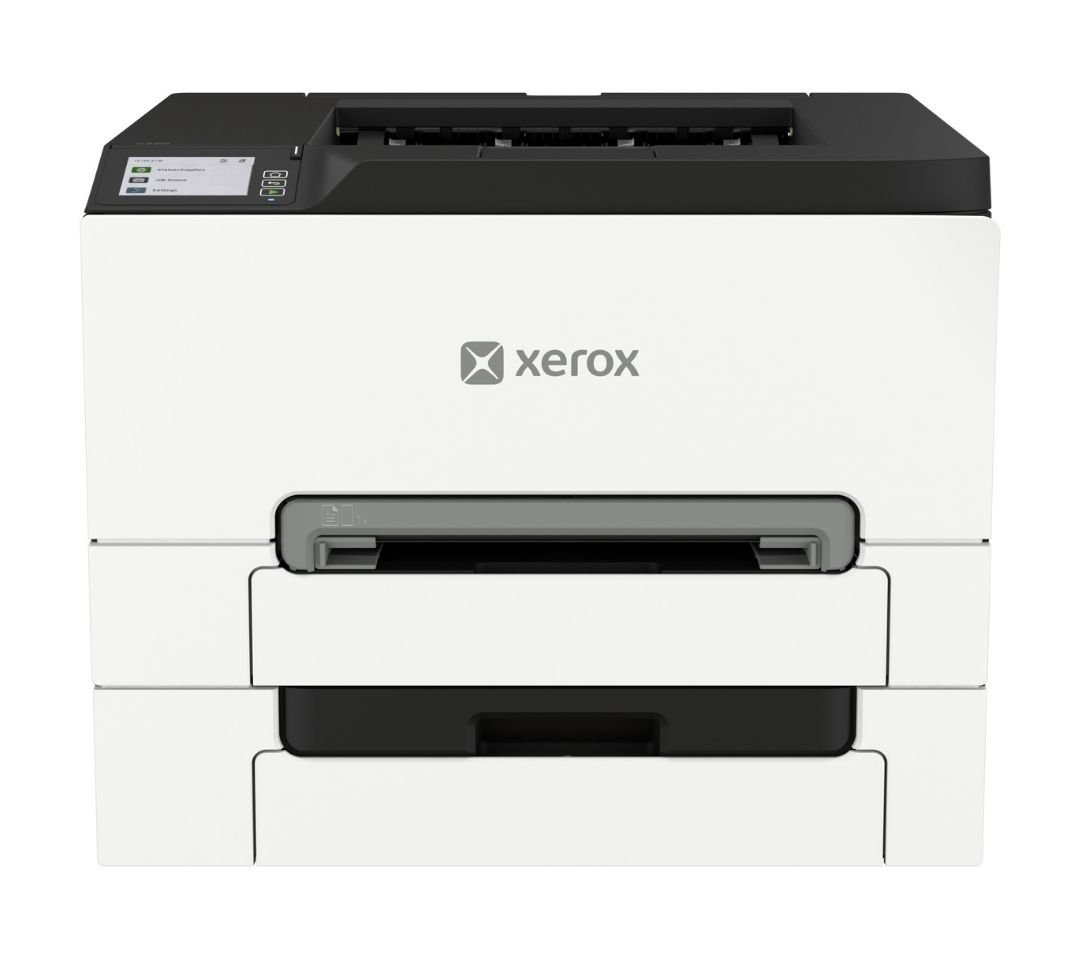
The Xerox C300 is a compact, single-function A4 color laser printer that produces color and black-and-white documents at up to 32 pages per minute. It is designed for small businesses, hybrid workplaces, and individual departments.
The C300 does not scan, copy, or fax. It gives small teams quicker output and more paper capacity than a basic desktop printer without the footprint of a floor-standing device.
It can print media up to 8.5 × 14 inches, making it suitable for reports, worksheets, proposals, forms, presentations, and short-run brochures.
Xerox C300 Specifications
- Print speed: Up to 32 ppm letter and 30 ppm A4 in color and black-and-white
- Print resolution: 2400 × 600 dpi
- Recommended monthly print volume: Up to 5,000 pages
- Monthly duty cycle: Up to 75,000 pages
- Connectivity: High-speed USB 2.0, Gigabit Ethernet, Wi-Fi, Wi-Fi Direct, Apple AirPrint, and Mopria
- Dimensions: 2 × 15.7 × 9.6 inches (W × D × H)
- Weight: 5 pounds
For routine use, follow the recommended volume of approximately 5,000 pages per month. The 75,000-page duty cycle represents a maximum during an unusually busy month.
Xerox C300 Key Features
Faster Color Printing in a Compact Footprint
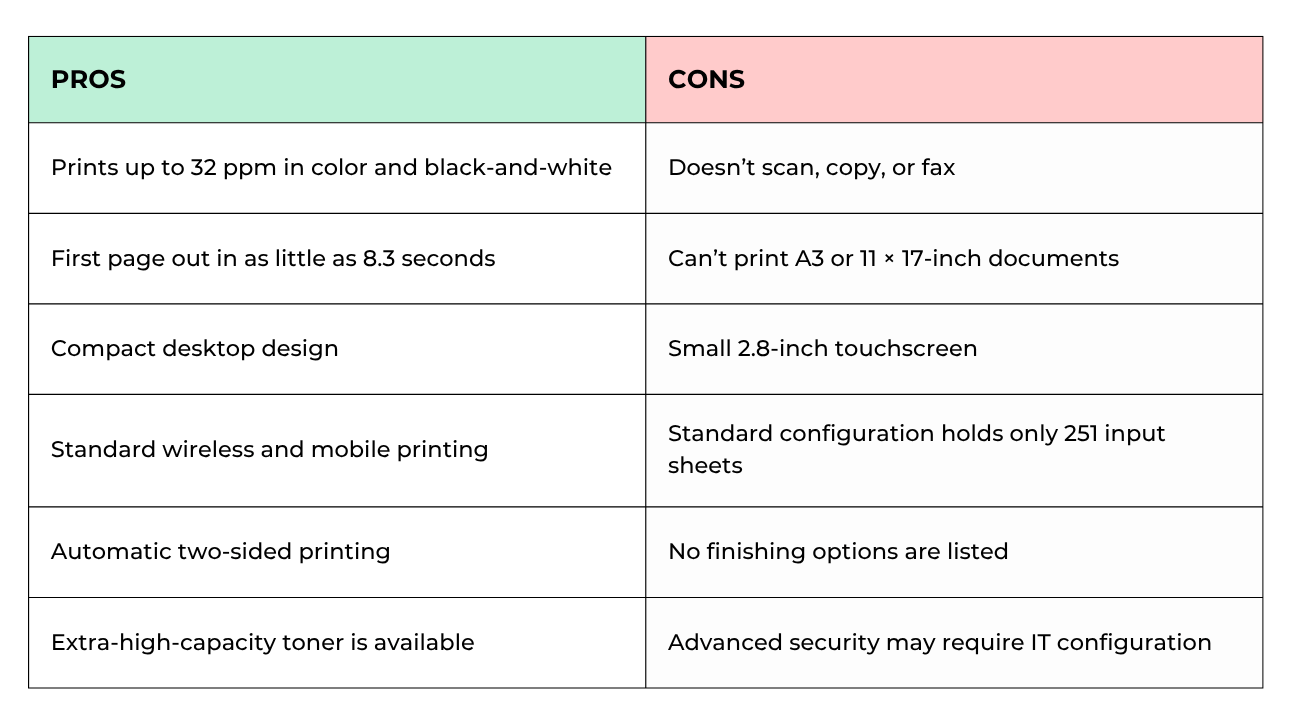
The C300 prints up to 32 pages per minute in both color and black-and-white. Its first page can arrive in as little as 8.3 seconds for black-and-white documents or 8.6 seconds for color, which helps reduce waiting during frequent, smaller print jobs.
Its 2400 × 600 dpi resolution supports crisp text and clear graphics for customer handouts, marketing reports, and other business documents. Production-level color work may still require a more specialized printer.
At 16.2 inches wide and less than 10 inches tall, the C300 can fit on a desk, counter, or shelf. Its compact frame is useful in shared areas, although enough clearance is still needed for ventilation and paper access.
Easier Setup and Printer Management
The C300 includes a 2.8-inch color touchscreen for checking supplies, changing settings, and managing print jobs. The display is useful for routine tasks, though it is smaller than the interfaces found on larger office printers.
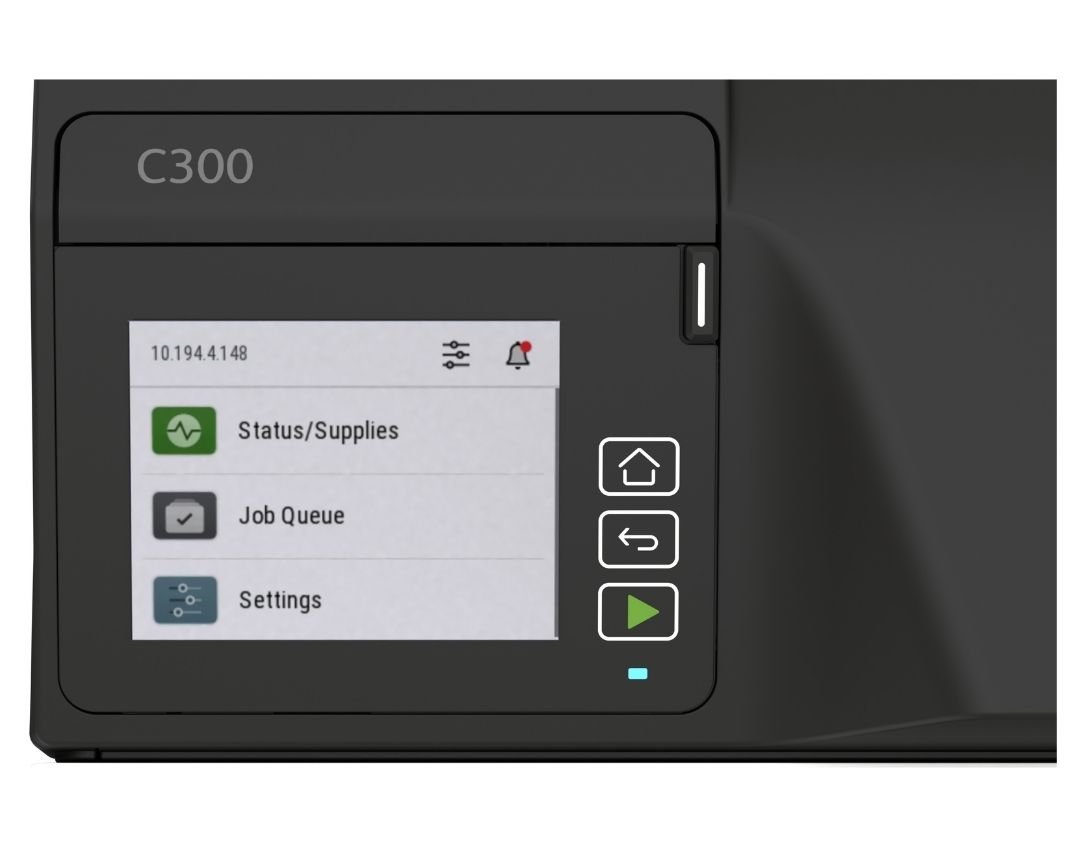
The Xerox Easy Assist App guides wireless installation and lets users monitor supplies, manage passwords, and access support from a phone or PC. The Xerox Print and Scan Experience App helps users discover the printer and manage print settings.
The Xerox Print Support App gives compatible Windows print queues more familiar Xerox controls and access to supported printer features.
Xerox Workflow Central can process digital documents through a computer or mobile device. However, the C300 has no scanner, so it cannot capture paper documents for those workflows by itself.
Flexible Placement and Expandable Paper Capacity
Standard Wi-Fi and Wi-Fi Direct allow flexible placement without network cabling. Employees can also print through Apple AirPrint, Mopria, Ethernet, or USB.
The main tray holds 250 sheets, while the manual feed slot handles one sheet. Two optional trays can raise total input to 751 sheets, reducing refills and keeping different media ready.
The printer supports automatic two-sided printing and media such as cardstock, envelopes, labels, letterhead, glossy paper, and recycled paper. It does not support A3 or 11 × 17-inch output, and no stapling or other finishing options are listed.
Xerox rates its operating sound pressure at 53 dB and standby noise at 14 dB. It should be reasonable for a shared workspace, but users seated directly beside it will still hear active print jobs.
Security and Sustainability Features
The C300 includes digitally signed firmware, WPA3, TLS 1.3, certificate management, access controls, Confidential Print, protected USB ports, audit logging, and non-volatile memory wipe. Its hardware also supports post-quantum cryptography standards.
Confidential Print holds a job until an authorized user releases it, helping keep sensitive pages out of the output tray. Some security settings require administrator configuration to deliver their full benefit.
More than 50% of the printer’s plastic content comes from post-consumer recycled material. The C300 also includes energy-saving modes, carries ENERGY STAR certification, and is EPEAT registered. Xerox accepts eligible used cartridges through its Cartridge Collection Program where available.
Xerox C300 Pros and Cons
How Much Does the Xerox C300 Cost?
As of September 2026, the Xerox C300 has a regular starting price of approximately $549. Pricing can change, so buyers should confirm the current amount before purchasing.
Ownership costs may also include toner, paper trays, an optional 128 GB Intelligent Storage Drive, a stand or cabinet, and service coverage.
The included cartridges yield approximately 1,300 black pages and 1,200 pages per color. Extra-high-capacity cartridges yield up to 6,200 black pages and 6,400 pages per color. Actual results vary with page coverage and print settings.
Who Is the Xerox C300 Best For?
The C300 may be a good fit for:
- Small workgroups that primarily need printing
- Teams producing up to approximately 5,000 pages per month
- Offices that regularly print color reports or customer materials
- Hybrid, branch, and field offices
- Workplaces that want expandable paper capacity
- Businesses with limited room for equipment
It may not be ideal for:
- Offices that need scanning, copying, or faxing
- Teams that regularly print 11 × 17-inch documents
- High-volume departments
- Businesses that need stapling or other finishing
- Organizations requiring production-level color accuracy
- Offices that rarely use color
Is the Xerox C300 Worth Buying?
The Xerox C300 is worth considering for a small team that values speed, color quality, and expandable paper capacity but only needs printing. Its standard Wi-Fi, straightforward management tools, and compact size make it practical for shared workspaces without demanding IT resources.
Its print-only format is also its biggest limitation. If scanning and copying are part of the daily workflow, a separate scanner could cancel out the space and simplicity benefits. The C300 makes the most sense when the office handles documents digitally.
Check out our reviews of the other similar models in the C-Series:
FAQ
Is the Xerox C300 a multifunction printer?
No. The Xerox C300 is a single-function color printer. It does not copy, scan, or fax.
Does the Xerox C300 print double-sided?
Yes. Automatic two-sided printing comes standard on compatible paper types and weights.
How much paper can the Xerox C300 hold?
The standard configuration holds 251 sheets. Adding two optional 250-sheet trays increases the maximum input capacity to 751 sheets.
Can the Xerox C300 print 11 × 17-inch paper?
No. It supports media up to 8.5 × 14 inches and cannot produce A3 or 11 × 17-inch documents.
How many pages can the Xerox C300 print per month?
Xerox recommends up to 5,000 pages per month. The 75,000-page duty cycle describes a maximum peak, not a routine monthly volume.
Find the Right Printer for Your Office
The Xerox C300 offers more speed and paper flexibility than many teams expect from a compact printer. For an office that mainly produces letter- and legal-size documents, it can provide capable color output without occupying much room.
Before choosing it, make sure a print-only device supports your workflow. Our Product Configurator can help you narrow down printers by volume, paper, and feature requirements.
If you would rather discuss your options, contact our team. We can help you choose a printer that supports your office now without leaving you undersized as your needs change.
