 Skip to main content

Printers play an important role in the office. If your team is small, the right device may simply need to produce quality color documents, connect easily, and fit comfortably on a desk or counter.
The recently launched Xerox C240 was built with that type of workplace in mind. It is a compact, single-function A4 color printer released alongside the Xerox C245 and C255 multifunction models. While those devices can print, copy, and scan, the C240 focuses exclusively on printing.
As a Xerox partner with decades of experience evaluating and servicing office printers, we understand that no device is right for every workplace. This review will look objectively at the Xerox C240’s specifications, features, advantages, limitations, cost, and ideal users so you can decide whether it fits your needs.
Table of Contents
- Short Answer: Is the Xerox C240 Worth Considering?
- What Is the Xerox C240?
- Xerox C240 Specifications
- Xerox C240 Key Features
- Xerox C240 Pros and Cons
- How Much Does the Xerox C240 Cost?
- Who Should Buy the Xerox C240?
- Is the Xerox C240 Worth It?
- FAQ
- Find the Right Printer for Your Office
Short Answer: Is the Xerox C240 Worth Considering?
The Xerox C240 is worth considering for small teams that need compact, professional-quality color printing without scanning or copying. It offers wireless connectivity, straightforward operation, and modern security, but its limited paper capacity and recommended monthly volume make it better for light-to-moderate use than high-volume office printing.
What Is the Xerox C240?
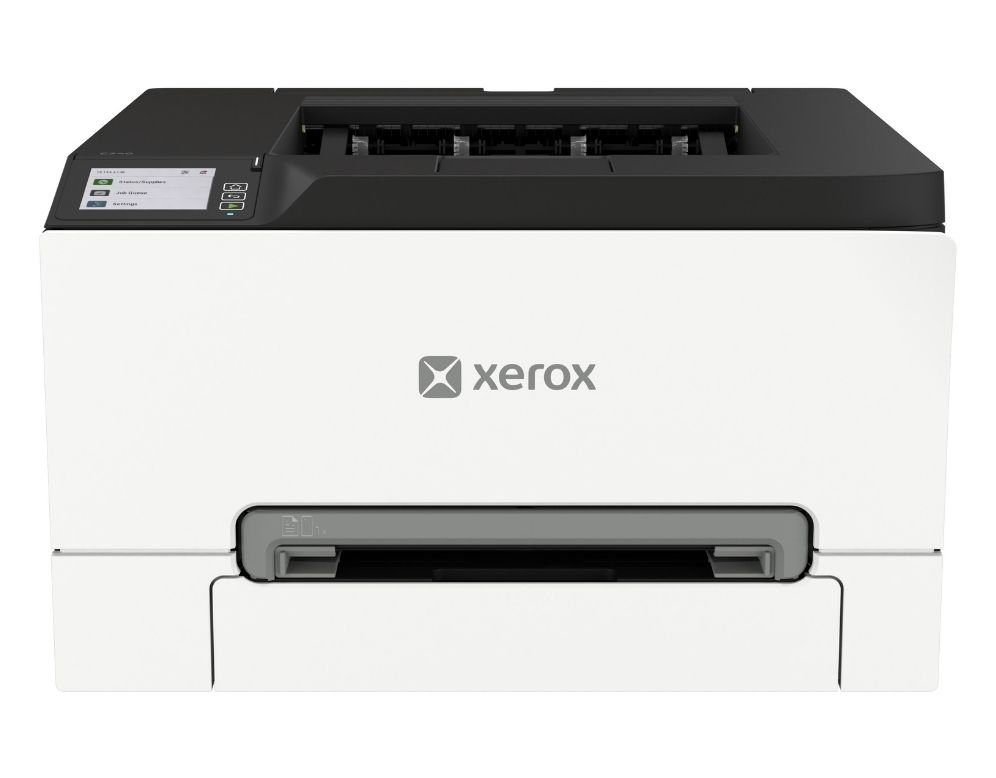
The Xerox C240 is a single-function A4 color laser printer that prints up to 26 pages per minute. It’s designed for small and midsized teams, hybrid employees, home offices, field offices, and other workspaces that need dependable color printing without a larger multifunction printer.
However, the C240 can only print. If your office needs a machine that can also scan, copy, or fax, consider the Xerox C245 or the C255.
With its ability to print letter- and legal-size documents, the C240 is great for everyday materials such as reports, presentations, forms, and customer handouts.
Its compact size also makes it easier to place on a desk, shelf, counter, or small printer stand.
Xerox C240 Specifications
- Print speed: Up to 26 ppm letter and 25 ppm A4 in color and black-and-white
- Print resolution: 2400 × 600 dpi
- Recommended monthly print volume: Up to 2,500 pages
- Monthly duty cycle: Up to 50,000 pages
- Connectivity: High-speed USB 2.0, Gigabit Ethernet, Wi-Fi, Wi-Fi Direct, Apple AirPrint, and Mopria
- Dimensions: 2 × 15.7 × 9.6 inches (W × D × H)
- Weight: 9 pounds
Xerox C240 Key Features
Compact Color Printing for Small Workspaces
The Xerox C240 combines color printing with a relatively small desktop footprint. It measures just over 16 inches wide and less than 10 inches tall, so it fits in workplaces where a floor-standing copier wouldn’t be able to.
Despite its size, the C240 prints in color and black-and-white at up to 26 pages per minute. Its first page can be produced in as little as 10.5 seconds for black-and-white documents or 10.7 seconds for color.
The printer’s 2400 × 600 dpi resolution and 4800 Color Quality can produce crisp text, vibrant graphics, and professional-looking business documents. It should work well for everyday office materials, although businesses that need highly specialized or production-level color may need a more advanced device.
The C240 is also limited to media up to 8.5 × 14 inches. It cannot print A3, 11 × 17-inch, or larger marketing materials.
Simple Setup and Everyday Operation
The C240 is approachable for offices without dedicated IT support. Although small, its 2.8-inch touchscreen provides access to everyday settings and print functions without requiring users to navigate a basic two-line display.
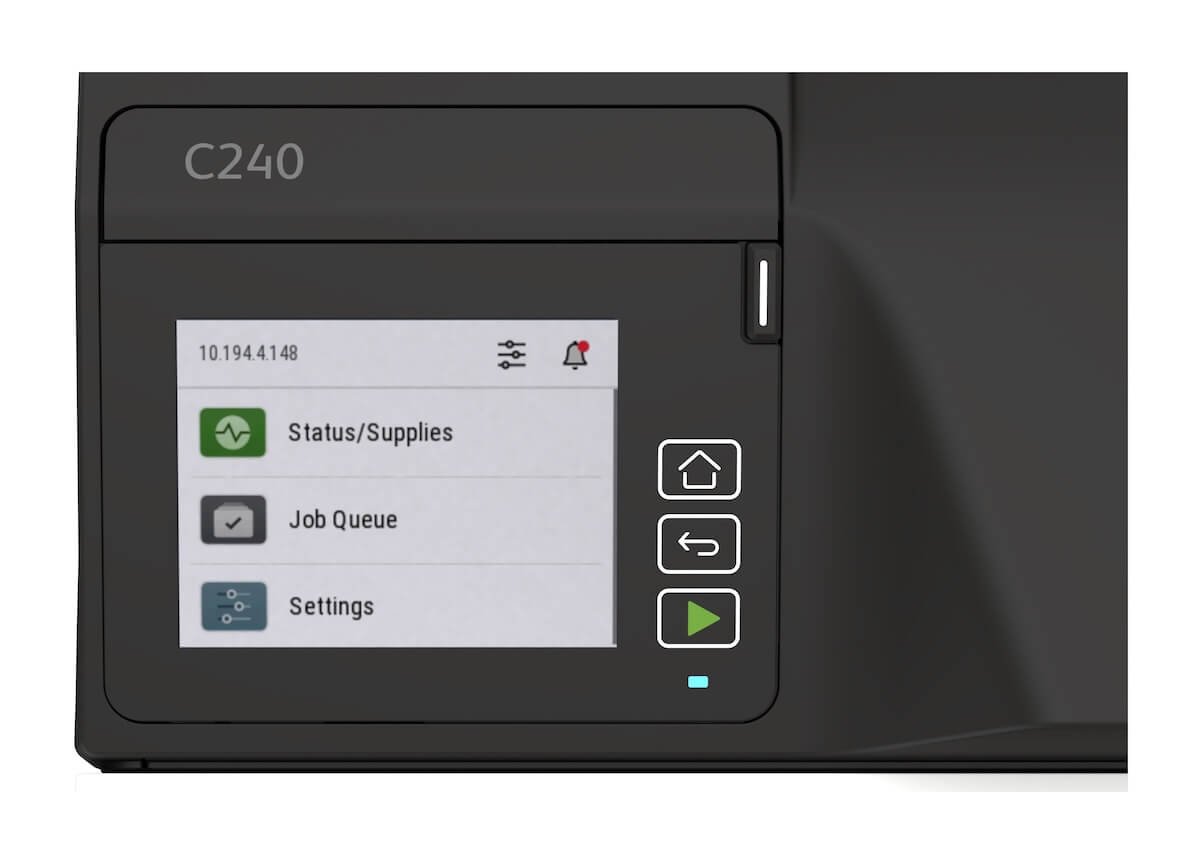
The Xerox Easy Assist App can help users install, manage, and monitor the printer from a mobile phone. Through the app, users can also check supply levels, access self-support resources, manage administrative passwords, and receive device information.
The printer also supports Apple AirPrint, Mopria, Wi-Fi Direct, Ethernet, and standard Wi-Fi. These options give employees several ways to connect and print from computers, phones, and tablets.
Security for Small and Hybrid Work Environments
The Xerox C240 includes multiple security controls designed to protect the printer, network connections, and documents.
Its security features include:
- Digitally signed firmware updates
- WPA3 wireless security
- TLS 1.3 encryption
- Certificate management
- Confidential Print
- Access controls
- Login restrictions
- Audit logging
- Non-volatile memory wipe
Xerox also describes the device as having a hardware-enabled, post-quantum-ready security architecture. This architecture is intended to help the printer support evolving encryption standards as security threats and technologies change.
These protections are notable for a compact printer, especially in hybrid workplaces where employees may connect from different devices. However, features such as access controls, certificates, and audit logging may require IT configuration to provide their full benefit.
Sustainability Features
The Xerox C240 is made with more than 50% post-consumer recycled plastic. It also includes energy-saving modes that reduce power consumption when the printer is sitting idle.
The device is ENERGY STAR certified and EPEAT registered. These certifications indicate that it meets established requirements related to energy efficiency and environmental performance.
Used Xerox cartridges can also be recycled through the Xerox Cartridge Collection Program where the program is available. Still, a printer’s environmental impact will depend partly on how it is used. Duplex printing, responsible purchasing, and cartridge recycling can all help reduce waste over the device’s lifespan.
Xerox C240 Pros and Cons
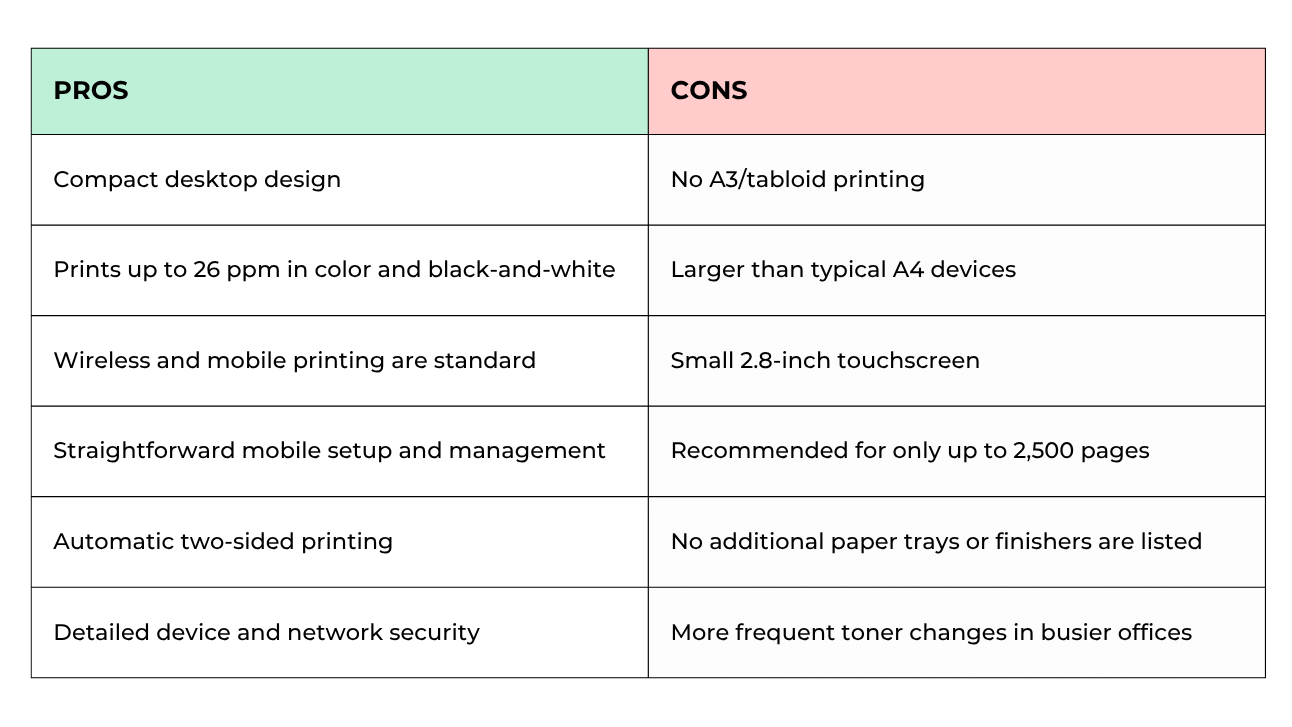
The C240’s greatest strength is its balance of size, usability, and color performance. It offers more functionality than a basic personal printer without taking up the space or investment of a large office MFP.
Its main limitation is capacity: with a 250-sheet tray and a recommended monthly volume of 2,500 pages, it's not suitable as the primary printer for a busy department.
How Much Does the Xerox C240 Cost?
Xerox currently lists the C240 at a starting price of $339. Pricing and promotional rebates can change, so buyers should confirm the current amount before purchasing.
The purchase price is only one part of the total cost of owning the printer. Buyers should also consider:
- Replacement toner
- Expected monthly color & b&w usage
- Waste toner bottle replacement
- Optional stand or cabinet
- Extended service coverage
- Shipping, installation, or taxes
High-capacity toner cartridges yield up to 3,000 pages for black and 2,500 pages for each color. The included starter cartridges yield approximately 750 black pages and 500 pages per color, so offices that print frequently may need replacement toner relatively soon.
Before buying, estimate how many pages your office prints each month (monthly print volume) and how much of that printing is in color. Color coverage and document type can significantly affect toner usage and overall operating costs.
Who Should Buy the Xerox C240?
The Xerox C240 may be a good fit for:
- Small businesses that primarily need printing
- Individual departments and small workgroups
- Home and hybrid offices
- Reception areas and field offices
- Teams that regularly print color reports or presentations
- Workplaces with limited space
- Offices printing approximately 2,500 pages per month or fewer
The Xerox C240 may not be ideal for:
- Offices that need scanning, copying, or faxing
- High-volume departments
- Teams that regularly print A3 or 11 × 17-inch documents
- Businesses that need several paper trays
- Organizations producing long print runs
- Offices that only need black-and-white output
A small office should not automatically choose the smallest available printer. Print volume, required functions, paper sizes, and long-term supply costs should determine whether the C240 is appropriately sized.
Is the Xerox C240 Worth It?
The Xerox C240 is a practical choice for small teams that need reliable color printing, modern connectivity, and security in a compact design. Its touchscreen and mobile management tools make it approachable, while its color resolution should be sufficient for most everyday business documents.
However, it’s not meant to replace a departmental MFP. The lack of scanning and copying, limited paper capacity, moderate toner yields, and recommended monthly volume of 2,500 pages make it better suited to light-to-moderate workloads.
If your office mainly prints letter- and legal-size documents and does not need multifunction capabilities, the C240 offers a useful balance of performance and simplicity. If your team scans frequently or expects its print volume to grow, a Xerox C245, C255, or larger VersaLink model may provide more room to expand.
Check out our reviews of the other similar models in the C-Series:
FAQ
Is the Xerox C240 a printer or a multifunction printer?
The Xerox C240 is a single-function color printer. It prints documents but does not scan, copy, or fax.
Does the Xerox C240 print double-sided?
Yes. The Xerox C240 supports automatic duplex printing on compatible paper types and weights.
What paper sizes can the Xerox C240 print?
The C240 supports paper sizes from 3.7 × 5.83 inches through 8.5 × 14 inches. It does not support A3 or 11 × 17-inch printing.
How many pages can the Xerox C240 print per month?
Xerox recommends printing up to 2,500 pages per month on average. Its maximum monthly duty cycle is 50,000 pages, but that amount is not intended to be sustained regularly.
What is the difference between the Xerox C240 and C245?
The C240 is a print-only device, while the C245 is a multifunction printer that can print, scan, and copy. The C245 is the more appropriate choice for offices that regularly digitize or duplicate documents.
Find the Right Printer for Your Office
The Xerox C240 makes sense when your office wants straightforward, compact color printing without paying for functions it will not use. Its limitations are equally important: it is not built for large paper sizes, high monthly volumes, or scanning-heavy workflows.
Before deciding, compare the C240 with printers that match your expected volume, required paper sizes, and everyday tasks. Our product catalog tool can help you filter Xerox devices by specifications and features so you can see which models genuinely fit your workplace.
If you would rather talk through the options, contact our team. We can help you compare the C240 with similar printers and determine whether a print-only device or multifunction model will provide the better long-term fit.
