 Skip to main content

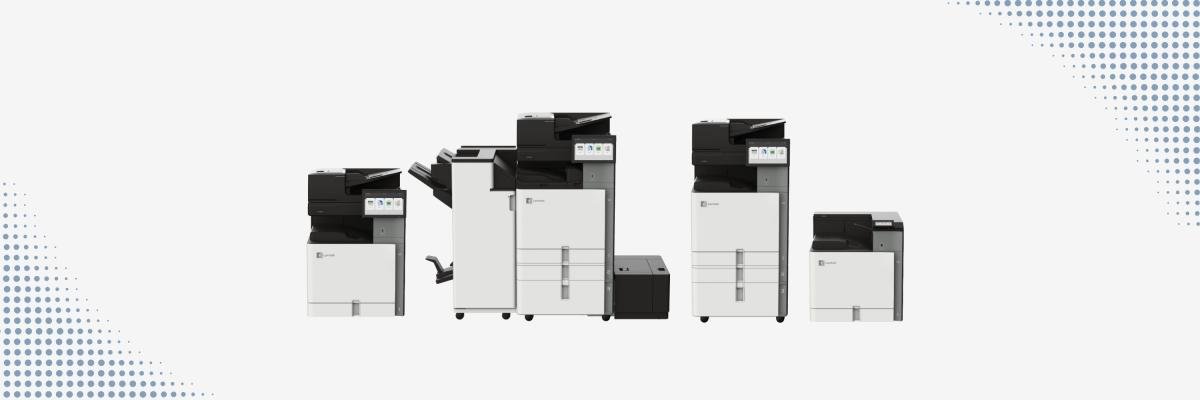
After Xerox acquired Lexmark in 2025, it wasn’t long before Lexmark revealed its first steps toward full integration with Xerox. The newest Lexmark 9-Series and the CX833 signify the beginning of this process.
As print vendors who partner with Xerox and who’ve been in the print industry for 40 years, we’ve been closely following this launch.
The Lexmark 9-Series introduces meaningful upgrades in usability, scanning, serviceability, workflow apps, and security. And because Xerox and Lexmark are now aligning their ecosystems, these devices also show an important shift in how organizations can standardize fleets moving forward.
In this article, we’ll walk through five standout new features in the Lexmark 9-Series and CX833, explain what each model is built for, and help you understand where these devices fit in modern office environments.
Table of Contents
- Overview of the Lexmark 9-Series and 8-Series A4 MFP
- New feature #1: Redesigned Touchscreen and Simpler UX
- New feature #2: Advanced Scanning Intelligence
- New feature #3: Easier Serviceability and Less Downtime
- New feature #4: Xerox Apps and Workflow Expansion
- New feature #5: Secure-by-Design Architecture
- Which Model Fits Your Business Best?
- FAQ
- Conclusion
Overview of the Lexmark 9-Series and 8-Series A4 MFP
The new Lexmark lineup gives businesses more choices than a typical product refresh.
The 9-Series focuses primarily on A3 multifunction printers and single-function printers, while the CX833 from the 8-Series adds a fast A4 color multifunction platform.
Here’s the current lineup:
A3 Color Multifunction Printers
- CX950 – 25 ppm
- CX951 – 35 ppm
- CX961 – 35 ppm
- CX962 – 45 ppm
- CX963 – 55 ppm
A3 Color Print-Only
- CS963 – 55 ppm
A3 Monochrome Multifunction
- MX953 – 55 ppm
A4 Color Multifunction
- CX833 – 55 ppm
Even though the CX833 technically belongs to the 8-Series, Lexmark and Xerox introduced it alongside the 9-Series because it shares the same:
- Modern tablet-style interface
- Advanced scanning architecture
- Workflow ecosystem
- Security platform
- Service-friendly design philosophy
Below are five standout features of the new series.
New feature #1: Redesigned Touchscreen and Simpler UX
One of the biggest upgrades across this platform is the new operator panel and simplified user experience.
Lexmark redesigned the interface to feel more like a modern tablet or smartphone, making it easier to navigate.
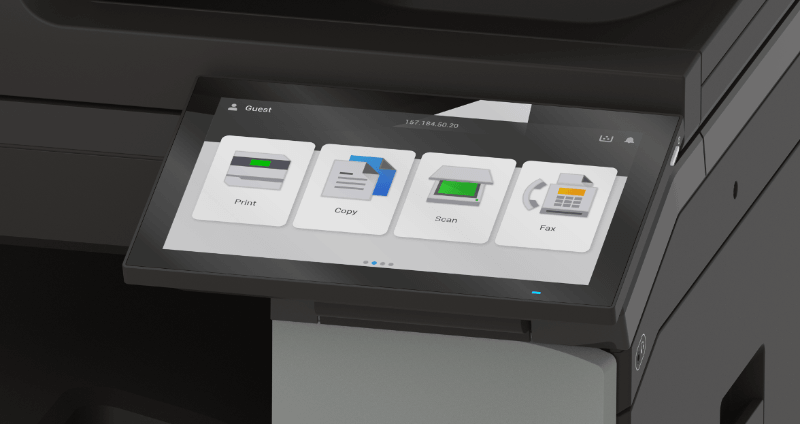
The new Lexmark models have a simpler menu. Instead of overwhelming users with dozens of buttons, the interface focuses on features/functions like:
- Scan
- Copy
- Fax
- Job queues
- Shortcuts
- Saved profiles
With these changes, users can now finish repeat tasks faster than before. This makes it easier for teams to adopt in busy office environments.
New feature #2: Advanced Scanning Intelligence
Teams with scan-heavy workflows will benefit most from this upgrade.
Select models like the CX961, CX962, CX963, and CX833 support scanning speeds up to 240 images per minute, along with single-pass duplex scanning and a 300-sheet DADF.
More importantly, the platform introduces intelligent protections that help prevent scanning errors:
- Multi-feed detection
- Skew detection
- Narrow media support
- Large input/output capacity
- Advanced duplex automation
In real office use, this means fewer interrupted workflows when scanning:
- Contracts
- HR packets
- Healthcare records
- Legal files
- Invoices
- Mixed-size packets
The scanner catches multi-feed issues before they become missing-page problems, which is especially useful in finance, education, and healthcare environments.
New feature #3: Easier Serviceability and Less Downtime
One of the most practical upgrades in the Lexmark 9-Series and CX833 is how much easier these devices are to maintain on a daily basis.
Instead of waiting for a technician for every small issue, the platform offers simplified maintenance features that help users and service teams fix common tasks faster.
Some of the most useful improvements include:
- A magnetic waste toner bottle for cleaner and easier replacement
- Fewer total service parts reduce complexity during repairs
- A single-layer internal design makes service areas easier to access
- A toner lock feature helps ensure toner is fully empty before being replaced
The optional toner lock feature can help organizations reduce waste and control supply costs.
With these upgrades, your organization can see benefits like:
- Fewer interruptions
- Easier user maintenance
- Less toner waste
- Faster service
These features also have a major impact on long-term uptime and total cost of ownership.
New Feature #4: Xerox Apps and Workflow Expansion
This is a big step towards the broader Xerox–Lexmark integration.
The Lexmark 9-Series devices are now eSF (Embedded Solutions Framework) -capable and support:
- Xerox Workflow Central
- Select cloud connectors
- Scan conversion to DOCX, XLSX, and PPTX
- Xerox Translate & Print
- Microsoft OneDrive
- Google Drive integrations
This update means that Lexmark 9-Series now supports many of the same digital transformation workflows that Xerox does.
As the Xerox-Lexmark ecosystems continue to align, it’s likely that more apps and workflows will be supported in the future.
New feature #5: Secure-by-Design Architecture
With the average cost of a print-related data loss being over $900,000, printer security is non-negotiable in any enterprise.
Lexmark built this platform around its Secure by Design approach, which includes hardware, firmware, authentication, encryption, and compliance controls built directly into the devices.
Some standout protections include:
- Trusted Platform Module (TPM)
- Secure boot verification
- TLS 1.3
- Secure by default settings
- Authentication and authorization controls
- Audit logs
- PrintCryption
- Common Criteria certifications
Lexmark’s security framework safeguards the device, data, and document workflow.
These protections are especially important for sectors such as healthcare, legal, finance, and government offices, where security is critical.
Which Model Fits Your Business Best?
Here’s a quick practical guide.
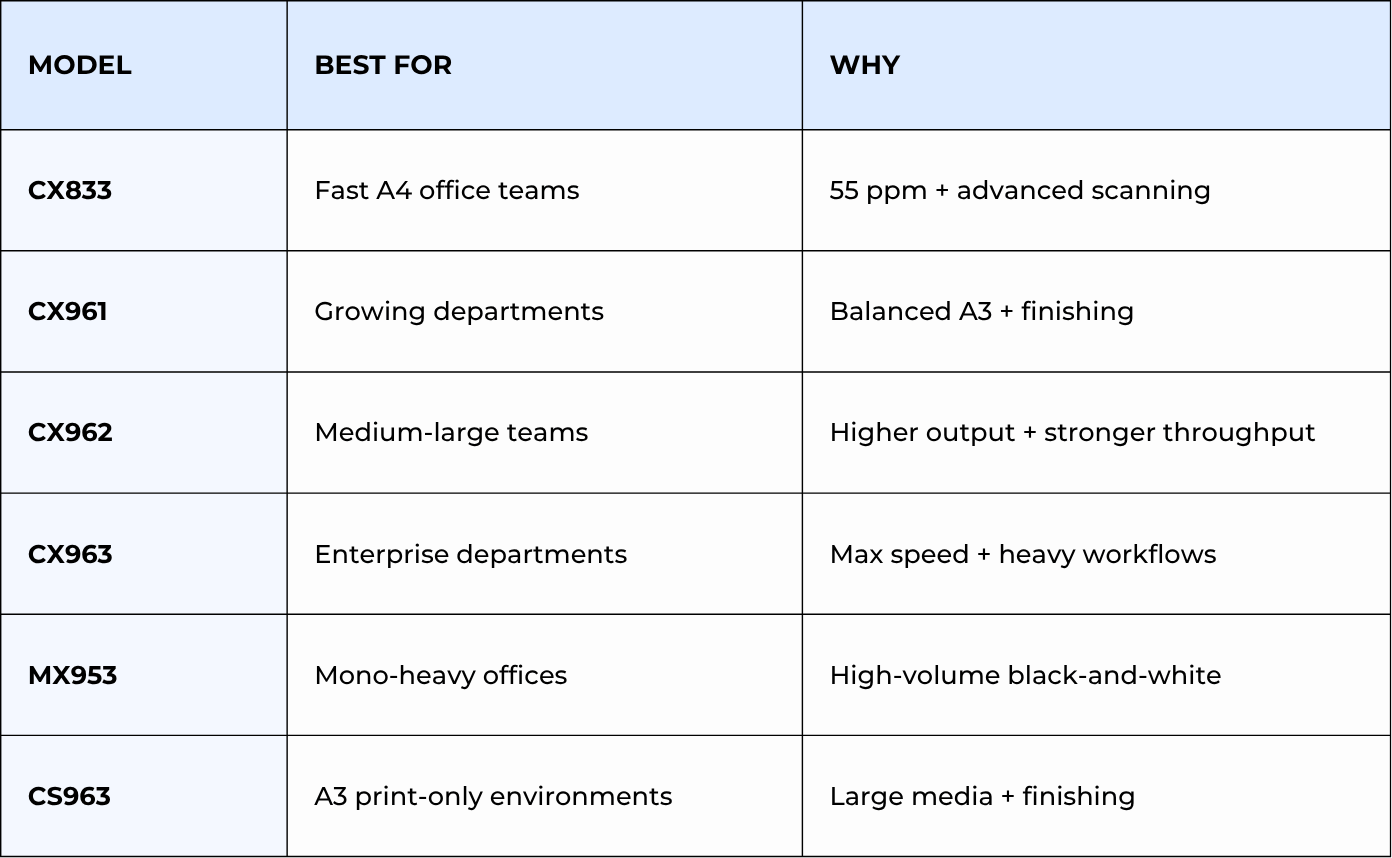
Check out our reviews of these models:
- CX961 review
- CX962 review
- CX963 review
- CX833 review
FAQ
What is the difference between the Lexmark 9-Series and the CX833?
The Lexmark 9-Series focuses mainly on A3 printers and MFPs, while the CX833 is an A4 color MFP. It’s often grouped with the 9-Series because it shares the same interface, scanning, workflow, security, and service design.
Which Lexmark 9-Series model is best for my business?
That depends on things like your monthly print volume and paper size needs. The CX833 works well for fast A4 office workflows, while the CX961, CX962, and CX963 are better for A3 departments with larger media and finishing needs.
Are the Lexmark 9-Series and CX833 compatible with Xerox workflow apps?
Yes, but not all of them. Select models support Xerox Workflow Central, cloud connectors, and scan conversion tools. This makes them ideal for businesses standardizing workflows across Xerox and Lexmark devices.
Find the Lexmark 9-Series Model That Fits Your Office Best
If your team has been dealing with slow workflows, difficult service experiences, or aging A3 and A4 devices that don’t keep up with your office demands, the new Lexmark platform is worth considering.
You’ve now seen how the Lexmark 9-Series and CX833 improve usability, scanning, serviceability, workflows, and security.
At STPT, we’ve spent nearly 40 years helping businesses choose office technology that makes day-to-day work easier. We can help you figure out which model best aligns with your print volume, media needs, and digital workflows.
If you’re considering the CX961, CX962, CX963, CX833, or another Lexmark model, contact our team, and we’ll help you compare the right fit for your office, workflows, and long-term support needs.
That way, your next printer investment solves today’s bottlenecks while supporting tomorrow’s growth.
