 Skip to main content

If you’re looking to upgrade your printer because it’s too slow when multiple people print at once, your team needs to print bigger things, or something isn’t working anymore, a good place to start is by reading reviews.
In this review, we’ll take a closer look at the Lexmark CX951se.
We’ve reviewed printers for nearly 40 years and have helped thousands of businesses find the right one. And while we work closely with Xerox and Lexmark solutions, this review is meant to help you decide if the CX951se A3 color multifunction printer is the right fit for your office.
Read below to see a breakdown of the CX951se’s features, strengths, tradeoffs, cost considerations, and where it fits compared to other A3 devices.
Table of Contents
- What Is the Lexmark CX951se?
- Lexmark CX951se Basics
- Key Features
- Pros and Cons
- How Much Does the CX951se Cost?
- Who Should Buy the CX951se?
- Final Verdict
- FAQ
Short Answer: Is the Lexmark CX951se Worth Considering?
The Lexmark CX951se is a 35 ppm A3 color multifunction printer. This machine is designed for growing offices that need fast output and strong scanning, finishing, and workflow capabilities. It stands out for its balance of speed, versatility, and modern app-driven workflows.
What Is the Lexmark CX951se?
The Lexmark CX951se is an A3 color multifunction printer built for large workgroups seeking greater speed and productivity without jumping into high-end enterprise models.
With 35 pages per minute output, it offers a noticeable improvement over entry-level A3 devices while remaining cost-effective.
It’s best suited for offices that are:
- Growing in print volume
- Expanding into A3/tabloid printing
- Producing more customer-facing documents
- Relying more heavily on scanning and digital workflows
Lexmark CX951se Basics
- Print speed: Up to 35 ppm color and black-and-white
- Monthly Duty Cycle: Up to 100,000 pages per month
- Recommended Monthly Print Volume: 4,000 – 20,000 pages
- Scan speed: Up to 200 ipm duplex
- Paper capacity: Up to 4,750 sheets max
- ADF: 200-sheet single-pass duplex feeder
- Print Resolution: 1200 x 1200 dpi
- Media support: Up to SRA3 and 12 x 18"
- Base Model Weight: 180.2 lb.
The CX951se a balanced A3 device for teams that need both performance and flexibility.
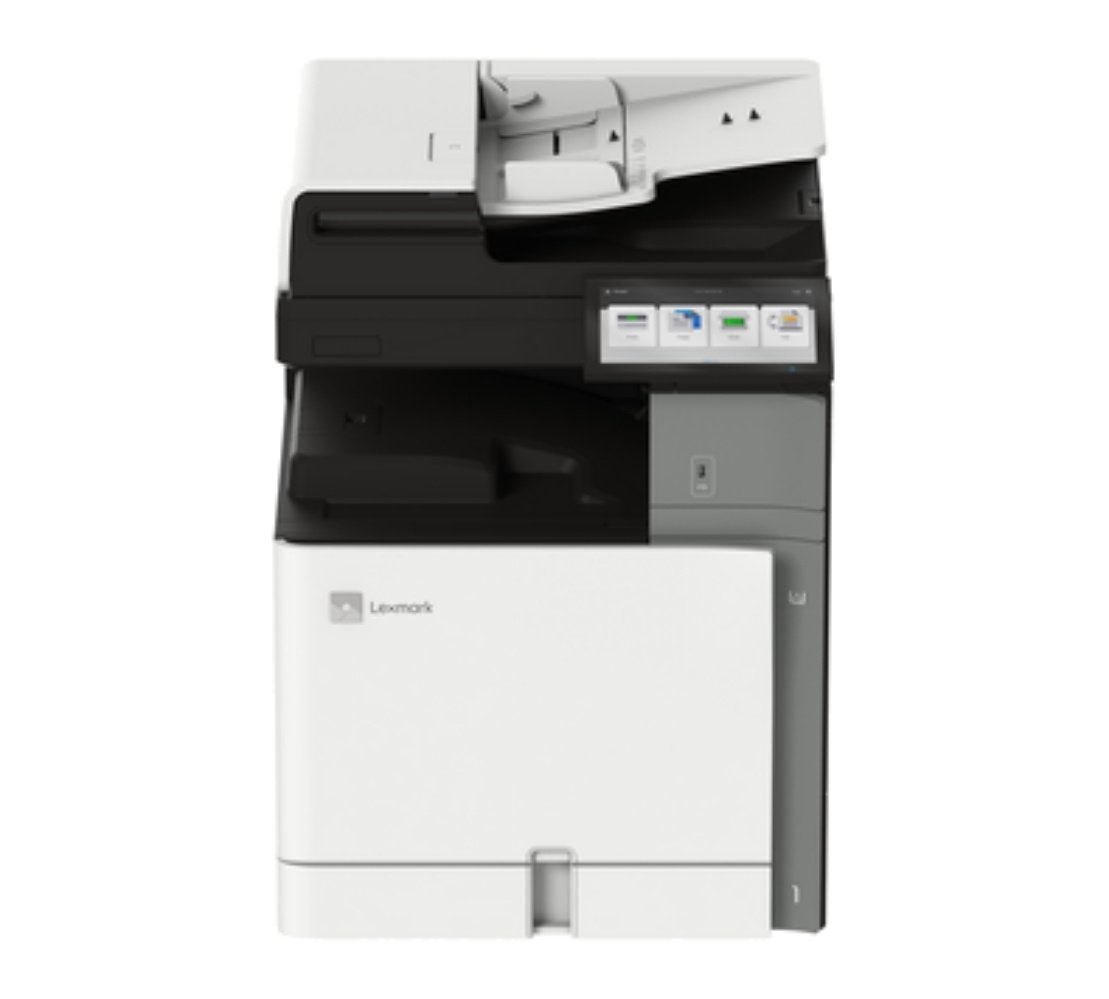
Below is a picture of the Lexmark CX951
Lexmark CX951se Key Features
Reliable Duplex Scanning for Everyday Volume
The CX951se offers single-pass duplex scanning at up to 200 images per minute. This makes it more than enough for most business workflows, such as contracts, onboarding packets, and invoices.
With its 200-sheet automatic document feeder, teams can process larger batches without constant interruption.
Simple UI & Easy Workflows
A big strength of the CX951se is how easy it is to navigate and maintain.
The 10-inch Lexmark e-Task touchscreen is an intuitive interface that makes everyday tasks like printing, copying, and scanning easy to navigate.
The CX951se also supports:
- Lexmark eSF (Embedded Solutions Framework) apps for workflow automation, scanning, and routing
- Xerox ConnectKey apps for Lexmark devices, including cloud connectors, document conversion, translation, and Workflow Central
This allows teams to scan directly to cloud platforms, automate repetitive tasks, and streamline document handling without making the device harder to use.
Maintenance is also made simpler. Features like one-handed toner replacement, easy-to-reach service areas, and clear alerts help reduce downtime and make daily management easier for both users and IT teams.
A3 and SRA3 Media Flexibility + Professional Color
The CX951se supports A3 (tabloid) printing for reports, spreadsheets, and presentations. It also supports SRA3 (Supplementary Raw Format A), which allows for extra space for full-bleed brochures, booklets, and marketing materials before trimming.
This machine’s media flexibility allows businesses to:
- Bring more print jobs in-house
- Produce professional-looking documents
- Reduce reliance on outside print vendors
The CX951se also includes professional color features, including PANTONE® calibration, which helps maintain consistent color output for branded materials, charts, and presentations.
Optional finishing includes:
- Stapling
- Hole punching
- Booklet making
- Folding
- Offset stacking
Overall, this printer is a strong option for teams that need polished, client-ready output without a production press.
Built-In Security for Business Environments
The CX951se relies on Lexmark’s Secure by Design framework, which is present throughout the Lexmark 9-Series. It includes enterprise-level security features such as:
- Trusted Platform Module (TPM)
- Secure boot
- Encrypted data handling
- Network security protocols
- Certificate management
- Audit Logging
Having these security measures helps protect sensitive documents and aligns with modern IT requirements.
Lexmark CX951se Pros and Cons
How Much Does the CX951se Cost?
The CX951se can be configured to include additional components such as input and finishing options. For this reason, the final cost will depend on what accessories you choose and whether you want to add software subscriptions and service agreements later.
If you want to know the long-term cost (true cost of ownership) of your printer, though, you’ll have to look at factors such as:
- Trays
- Finishers
- Service agreements
- Software
- Installation
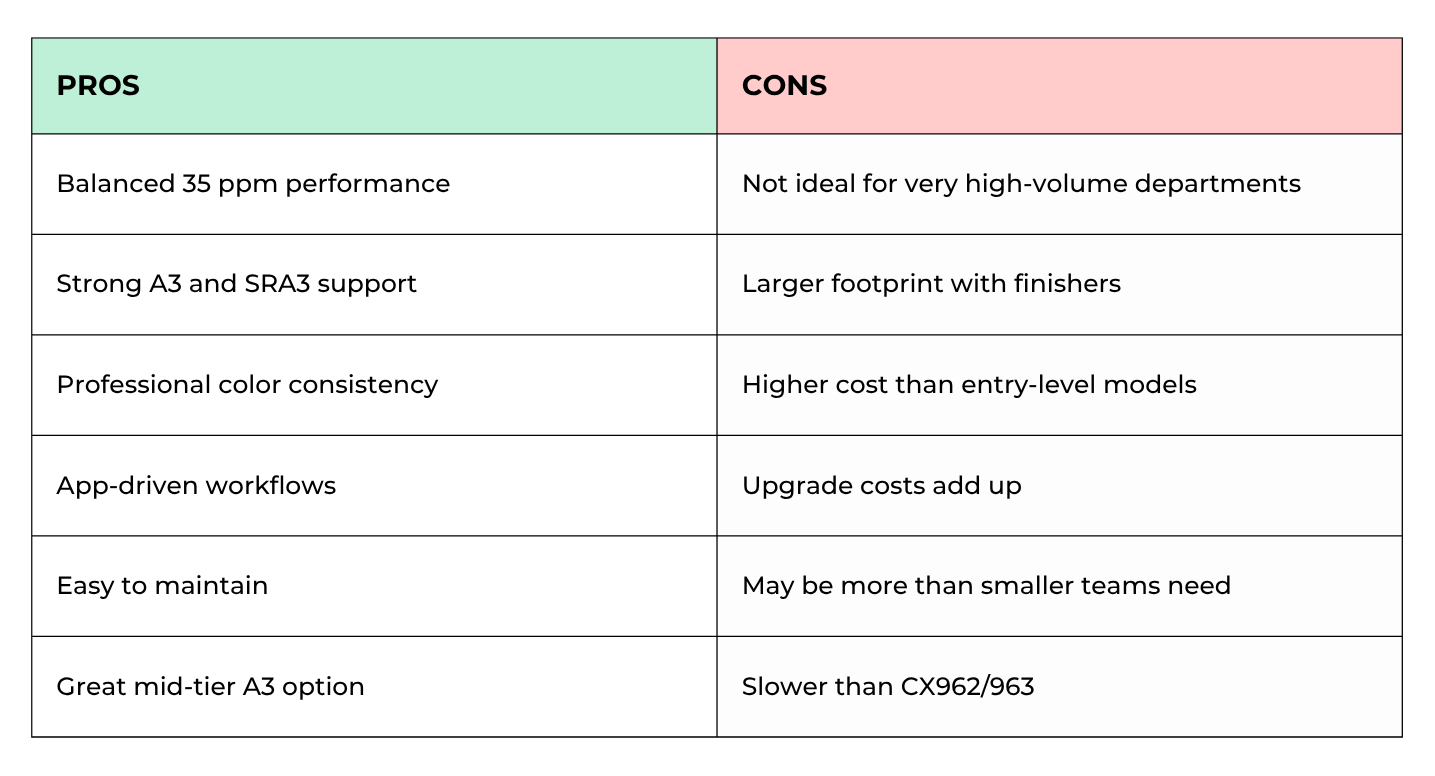
Compared to entry-level models, this model costs more, but offers more speed, flexibility, and workflow capability.
Who Should Buy the CX951se?
Best fit:
- Growing offices
- Teams transitioning to A3 printing
- Departments with moderate-to-high print volume
- Businesses producing client-facing documents
- Schools and administrative teams
Probably not ideal:
- Low-volume offices
- Small teams under 10 users
- High-volume print rooms needing 45–55 ppm
- Businesses that only print letter-size documents
Is the Lexmark CX951se Worth It?
The Lexmark CX951se is one of the best mid-tier A3 color MFPs for offices that want speed and flexibility but don’t need the capabilities of a high-end enterprise machine.
Its biggest advantages are its balanced performance, media versatility, professional color features, and workflow-friendly design.
For many businesses, this is the model that hits the “just right” point between capability and cost.
FAQ
Is the CX951se better than the CX950se?
Yes. It offers faster print speeds (35 ppm vs 25 ppm) and is better suited for growing offices.
Does the CX951se support A3 and SRA3?
Yes. It supports both, allowing for larger documents and full-bleed marketing materials.
Is the CX951se good for growing teams?
Yes. It’s designed for offices that need more performance than entry-level models but don’t require high-speed enterprise output.
See If the CX951se Fits Your Office
If your team is starting to outgrow entry-level printers and needs faster output, A3 capability, and better workflow tools, it’s time to match your needs to the right configuration.
Use our Product Configurator to compare the CX951se with other Lexmark and Xerox A3 multifunction printers based on your print volume and workflow needs.
Not sure what setup makes the most sense? Request a quote, and we’ll help you build the right configuration for your office.
