 Skip to main content

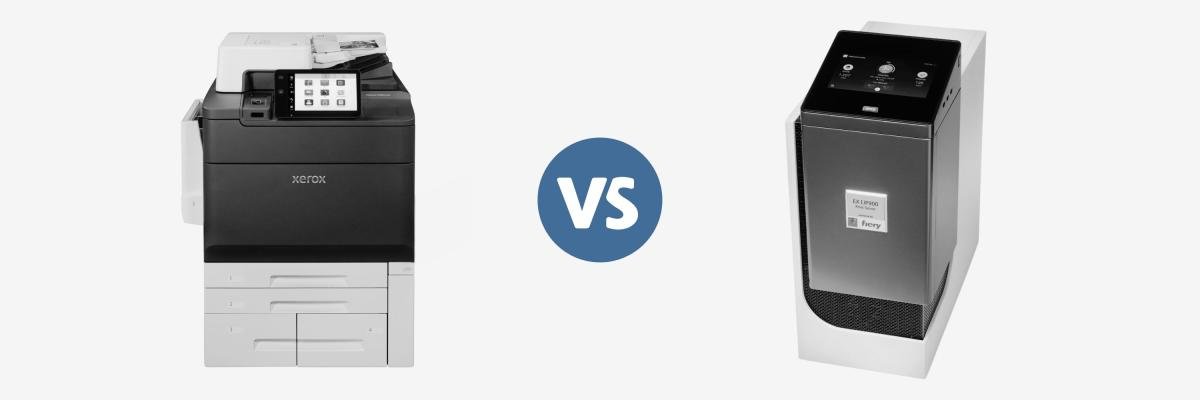
If you own or are evaluating a production machine, you’ve likely noticed that production print environments are becoming more automated and personalized. This means that supporting technology such as print servers play an increasingly important role. In fact, the global digital printing market is expected to grow at a CAGR of 4.6% from 2025 to 2033. This growth is driven by demand for shorter print runs, faster turnaround times, and personalized and specialized printing.
Organizations evaluating production printers often ask us whether they should choose the integrated Fiery controller or upgrade to an external Fiery print server.
We at STPT always adhere to the principle that the answer will depend on your specific print environment.
Before we dive in, we want to disclose that STPT partners with Xerox and regularly installs production printers that offer both integrated and external Fiery controller options. We'll use Xerox devices as examples throughout this article because they're the systems we know best. However, the concepts we'll discuss apply to Fiery-powered print servers across several major production printer manufacturers.
The goal of this guide is to help you understand the differences so you can make a decision that fits your workflow, budget, and long-term goals.
Whether you're running an in-plant print department, a commercial print shop, or you're simply exploring your first production printer, this guide will help you understand where each option shines.
Not sure if Fiery suits your needs? Find out: Is Fiery the Right DFE for Your Print Environment?
Table of Contents
- Short Answer: Integrated vs. External Fiery Controllers
- What Is the Difference Between an Integrated and External Fiery Controller?
- Integrated vs. External Fiery: Side-by-Side Comparison
- When Is an Integrated Fiery Controller Enough?
- When Does an External Fiery Controller Become Worth the Investment?
- How the Biggest Differences Affect Everyday Production
- Which Print Environments Benefit Most from an External Fiery Controller?
- How to Decide Which Fiery Controller Is Right for You
- FAQ
- Final Thoughts
Short Answer: Integrated vs. External Controllers
If you're looking for the short version, here's the key takeaway:
- An integrated Fiery controller is great for organizations with moderate print volumes, straightforward workflows, and standard color requirements. It’s reliable and keeps costs lower.
- An external Fiery controller is for environments that process large or complex jobs, need advanced color management, depend on workflow automation, or just can't afford production bottlenecks. Its extra processing power and software boost efficiency in demanding print jobs.
Consider what you print, how much you print, and how critical speed, color accuracy, and automation are to your business.
What Is the Difference Between an Integrated and External Fiery Controller?
In reality, both integrated and external Fiery controllers work towards the same goal.
A Fiery controller is a type of digital front end (DFE) that processes print jobs before they're sent to the printer. It manages tasks like raster image processing (RIP), color management, job scheduling, and workflow automation to help produce accurate, consistent results.
The biggest difference between these two Fiery options is how much they can do and how quickly they can do it.
Integrated (Embedded) Fiery Controllers
An integrated Fiery controller is built directly into the printer or press. Because it's part of the device itself, it typically uses more energy-efficient hardware and can reliably handle everyday production printing. Integrated controllers often include Fiery tools that suit many organizations without adding extra complexity.
Integrated controllers offer an ideal balance of performance, simplicity, and affordability for organizations with moderate production needs.
External Fiery Controllers
An external Fiery controller is a dedicated print server that sits outside the printer and connects directly to it.
It offers a lot more processing power for demanding production environments. External controllers also unlock additional Fiery software and advanced workflow tools that support higher print volumes, more sophisticated document preparation, greater color control, and increased workflow automation.
An external controller expands the printer's capabilities and helps organizations get more performance and flexibility from the same print engine.
Integrated vs. External Fiery Controllers
| Feature | Integrated Fiery Controller | External Fiery Controller |
| Hardware | Built in or bustled directly to the printer | Separate dedicated print server |
| Processing Speed | Designed for moderate workloads | Faster RIP processing for demanding environments |
| Workflow Automation | Standard Fiery features | Advanced automation and document management |
| Color Management | Strong color management for most business needs | Advanced calibration, spot color tools, diagnostics, and correction capabilities |
| Scalability | Ideal for growing office production | Designed for high-volume production environments |
| Best For | Corporate offices, schools, churches, internal marketing departments | Commercial printers, in-plants, CRDs, graphic design agencies, mailing facilities |
It’s important to remember that beyond the controller, your monthly print volume, file complexity, operator experience, and color expectations all help determine which option delivers the best value.
When Is an Integrated Fiery Controller Enough?
While it’s often thought that more power is always better, many organizations will never need the extra capabilities an external Fiery controller offers.
If your print environment has predictable workloads and doesn't need extensive document preparation or advanced color adjustments, an integrated Fiery controller is enough.
For example, an integrated controller is typically a great fit for:
- Schools and universities producing classroom materials
- Churches creating weekly bulletins and event materials
- Corporate marketing departments printing internal collateral
- Businesses producing brochures, presentations, and training manuals
- Organizations with moderate monthly print volumes
For these environments, Fiery’s strong color management, efficient RIP processing, and intuitive job handling get the job done without paying for advanced features.
In fact, many modern integrated controllers can handle everyday tasks quickly enough that most users won't notice any limitations.
As your print demands evolve, however, a built-in controller may no longer be enough. Next, we'll look at the signs that it's time to upgrade to an external Fiery controller.
When Does an External Fiery Controller Become Worth the Investment?
It’s possible that the demands of your print environment may be outgrowing what an embedded controller can handle.
This can happen because you're printing more or handling more complex jobs under tighter deadlines and higher expectations for quality and consistency.
An external Fiery controller runs on dedicated hardware, so it has more processing power for demanding workflows. This allows operators to spend less time waiting for jobs to process and more time producing finished work.
Consider an external Fiery controller if your operation regularly experiences challenges like:
- Long RIP times when processing large or graphics-heavy files
- Variable data printing (VDP) jobs with personalized text, images, or barcodes
- Strict brand color requirements across multiple print runs
- Multiple operators sending jobs to the same press
- Tight production deadlines where every minute matters
- A growing workload that is starting to create bottlenecks
If several of these challenges sound familiar, it's often a sign that your workflow is becoming the limiting factor.
As one of our production print specialists explained, the question isn't simply whether an external controller is faster. It's whether that additional performance helps your team work more efficiently and produce better results.
How Do the Biggest Differences Affect Everyday Production?
On a specification sheet, it's easy to compare processor speeds or software features. But in day-to-day production, those technical differences translate into practical business benefits.
Here are the areas where organizations tend to notice the biggest impact.
Faster File Processing Means Less Waiting
An external Fiery controller’s computing resources can more efficiently handle workloads such as large PDFs, booklets, and catalogs. In turn, operators spend less time waiting for files to RIP and more time keeping the press running.
For organizations producing hundreds or even thousands of jobs each week, those time savings can quickly add up.
Advanced Color Management Improves Consistency
If you're producing marketing collateral, direct mail campaigns, or customer-facing documents, even small color variations can lead to reprints or dissatisfied clients.
External Fiery controllers offer advanced color management to help operators maintain consistent color across different media, multiple print runs, and changing production conditions.
To learn more about how these tools work, read our guide on How Fiery Color Management Works (and Why It Matters).
Workflow Automation Reduces Manual Work
As print volumes increase, so do the number of repetitive tasks operators perform throughout the day.
External Fiery controllers can include additional workflow automation tools that can simplify many of these processes.
Depending on the environment, this may include:
- Saving frequently used job presets
- Automating repetitive production tasks
- Managing multiple print queues more efficiently
- Scheduling jobs to maximize press uptime
Rather than operators manually configuring every job, automation helps standardize production while reducing the likelihood of human error.
More Powerful Document Preparation Tools
Preparing a document for production printing often involves tasks such as inserting tabs, combining multiple files, and creating booklets.
External Fiery controllers can offer a wider range of document preparation tools that make these tasks faster and easier.
Better Scalability for Growing Print Operations
As an organization’s production needs grow, they begin producing more personalized documents, larger print runs, or more complex marketing materials.
Because external Fiery controllers are designed for more demanding environments, they provide room to grow without immediately becoming a bottleneck.
Which Print Environments Benefit Most from an External Fiery Controller?
It ultimately comes down to how complex your work is and how much efficiency matters to your operation.
Organizations that typically benefit the most include:
- Commercial Print Shops
- Corporate In-Plant Print Departments
- Colleges and Universities
- High-Volume Marketing and Creative Teams
- Organizations Running Variable Data Printing
Of course, not every organization in these industries automatically needs an external controller. Some smaller organizations have demanding workflows that benefit from an external controller.
Instead of solely focusing on company size or print volume, evaluate how your team works, the types of jobs you produce, and where you want your print operation to go in the future.
How Do You Know Which Fiery Controller Is Right for You?
By this point, you may already have a good idea of which direction makes sense for your print operation. To make the right choice, choose the controller that best supports the work your team does every day.
Before making a decision, ask yourself these questions:
What types of documents do you print?
The more complex your jobs become, the more valuable an external Fiery controller can be.
How much do you print each month?
As production volume and job complexity go up, an external controller can help eliminate bottlenecks.
How important is color consistency?
An external Fiery controller provides additional tools to help maintain that consistency.
Would workflow automation save your team time?
Workflow automation can boost productivity if you frequently repeat setup steps, manually adjust jobs, or troubleshoot files before printing.
Where do you see your print operation in the next three to five years?
If you're planning to expand services or print volume, additional workflow capabilities can help you prepare for future growth.
FAQ
Is an external Fiery controller faster than an integrated controller?
Yes. An external Fiery controller is faster due to dedicated hardware, especially in high-volume or graphics-intensive printing.
Does an external Fiery controller improve print quality?
An external Fiery controller can enhance print quality by providing advanced color management, calibration, diagnostics, and correction tools for more consistent and accurate results.
Is an integrated Fiery controller enough for most businesses?
Yes. For organizations with moderate print volumes, standard business documents, and no advanced workflow automation or color management, an integrated Fiery controller is enough.
Can you upgrade from an integrated Fiery controller to an external one later?
In many cases, yes. Organizations can upgrade from an integrated Fiery controller to an external one if production needs grow. Your print vendor can help determine what upgrade options are available for your specific equipment.
Is an external Fiery controller only for commercial print shops?
No. Corporate in-plant print departments, universities, government agencies, marketing departments, and other high-volume production environments can also benefit from an external Fiery controller.
Key Takeaways
If you're looking for the short version, here are the main points to remember:
- Integrated Fiery controllers are ideal for many organizations with moderate production needs and standard workflows.
- External Fiery controllers offer greater processing power, more advanced color management, and additional workflow automation for demanding print environments.
- The right choice depends on your print volume, document complexity, color requirements, and long-term goals.
- The right controller should improve productivity and support your workflow, not purchasing the most powerful option available.
- Select a controller that enhances productivity and supports workflows over simply choosing the most powerful.
Choose the Controller That Fits Your Workflow
Each type of controller is designed to support different types of production environments.
For many organizations, an integrated Fiery controller provides sufficient performance, ease of use, and value. For others with high print volumes, demanding color standards, or complex workflows, an external Fiery controller improves productivity, consistency, and efficiency.
Taking the time to evaluate your workflow before making a decision can help ensure you're investing in technology that supports your team for years to come.
Ready to Choose the Right Fiery Controller?
If you're evaluating production printers and aren't sure whether an integrated or external Fiery controller is the better fit, we'd be happy to help.
At Strategic Technology Partners of Texas, we help organizations across North Texas and Southern Oklahoma design production print environments that match their workflows.
Talk to one of our production print specialists to discuss your print volume, workflow, color requirements, and long-term goals. We'll help you determine which Fiery configuration makes the most sense for your operation.
