 Skip to main content

When it comes to purchasing a printer, saving money is a top priority for most. This is especially true when you have a limited budget. But, you also don’t want to just purchase any cheap printer and have it break down when you most need it. You want a quality printer that won’t break the bank.
In this guide, we'll look at five of the best budget printers available in 2026 and explain who each model is best suited for. With 40+ years of experience in the printer/copier industry, we have broad knowledge of the various types of machines out there.
While we primarily work with businesses, we’ve evaluated printers across several brands and know what makes a printer both affordable and worthwhile.
While these may not be the only options available, they give you a good baseline of what's out there as you search for your next printer.
Table of Contents
- What Is the Best Budget Printer in 2026?
- What Makes a Printer Budget-Friendly?
- How We Chose These Printers
- The 5 Best Budget Printers in 2026
- FAQ
- Which Budget Printer Is Right for You?
Need help deciding what to look for in a budget-friendly printer? Check out our blog on How to Choose a Printer for Your Budget and Business Needs to learn more.
What Is the Best Budget Printer in 2026?
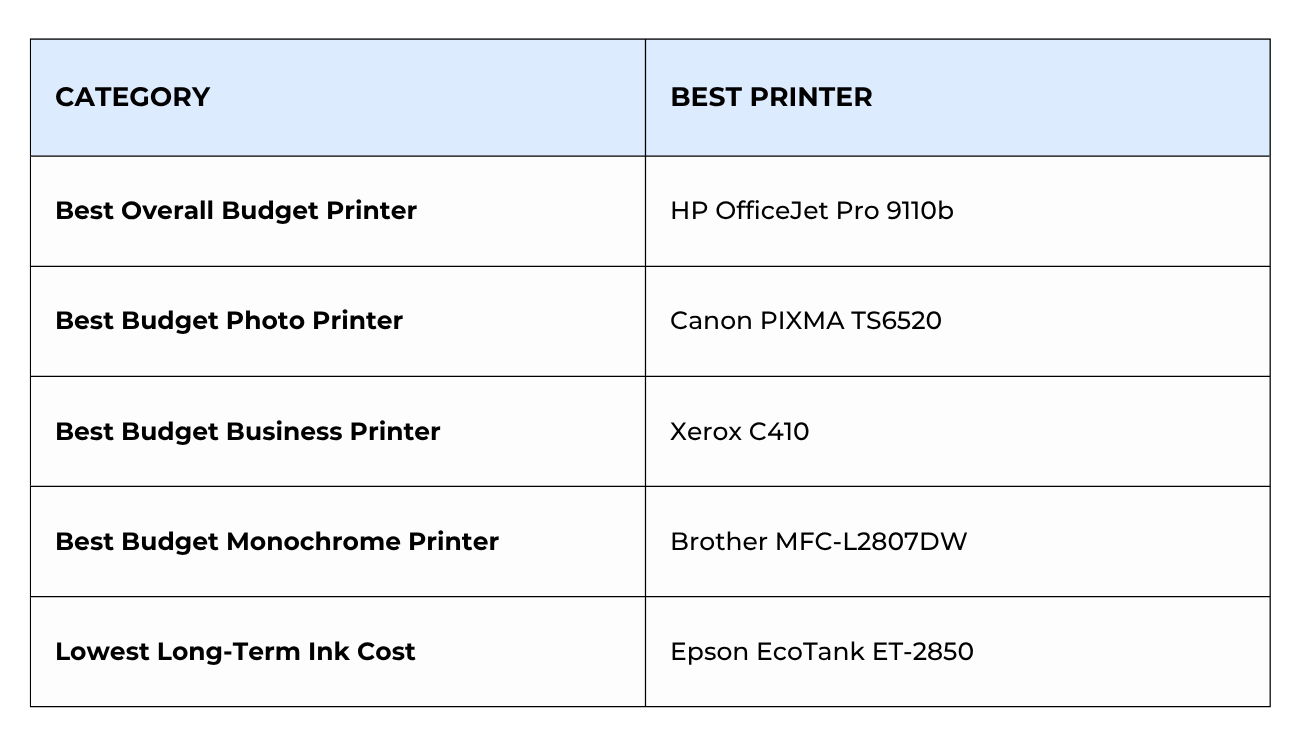
The best budget printer depends on how you plan to use it. The HP OfficeJet Pro 9110b is one of the strongest overall values for home offices, while the Canon PIXMA TS6520 is an excellent choice for families and home users who need affordable all-in-one functionality. Users with higher print volumes may find greater value in printers like the Xerox C410 or Epson EcoTank ET-2850.
Comparing the Best Budget Printers in 2026
What Makes a Printer Budget-Friendly?
A low purchase price doesn't always mean a printer is budget-friendly.
When evaluating affordable printers, it's important to consider:
- Initial purchase price
- Ink or toner replacement costs
- Print speed
- Reliability
- Monthly print volume
- Included features
For example, let’s say you buy a $60 printer, but you have a high monthly print volume. Over time, the cost of replacing cartridges can quickly offset those savings. Depending on your printing goals and needs, spending a little more upfront can reduce your long-term printing costs.
The printers on this list balance affordability with overall value.
Learn more about the true total cost of owning a printer here.
How We Chose These Printers
When selecting the printers for this list, we focused on four primary factors:
- Cost: Each printer offers a relatively affordable entry point compared to similar devices in its category.
- Features: We looked for printers that provide useful functionality such as wireless printing, duplex printing, scanning, copying, or mobile printing support.
- Reliability: We prioritized models from top brands with strong reputations and proven track records.
- Overall Value: We focused on printers that offer the most value for the money.
The 5 Best Budget Printers in 2026
HP OfficeJet Pro 9110b
Why We Recommend It
The HP OfficeJet Pro 9110b is one of the best budget printers for small offices and home offices because it offers fast print speeds, strong connectivity options, and business-oriented features at an affordable price point.

Basic Specifications
- Print Speed: Up to 22 ppm black / 18 ppm color
- Print Resolution: 1200 x 1200 dpi
- Recommended Monthly Print Volume: Up to 1500 pages
- Base Model Dimensions (WxDxH): 17.3” x 13.5” x 7.7”
- Base Model Weight: 13.6 pounds
- Cost: Starting at around $199 at HP and Amazon
Best For: Home offices, remote workers, and small teams that need affordable color printing.
Despite its relatively low price, the OfficeJet Pro 9110b includes features commonly found on more expensive business printers, including automatic duplex printing, dual-band Wi-Fi, Ethernet connectivity, and a 250-sheet paper tray.
The printer is designed for productivity, with print speeds of up to 22 pages per minute in black and white and support for mobile printing through Apple AirPrint and Wi-Fi Direct.
One drawback is that this is a print-only device, so users who need scanning or copying functionality may want to consider an all-in-one printer instead.
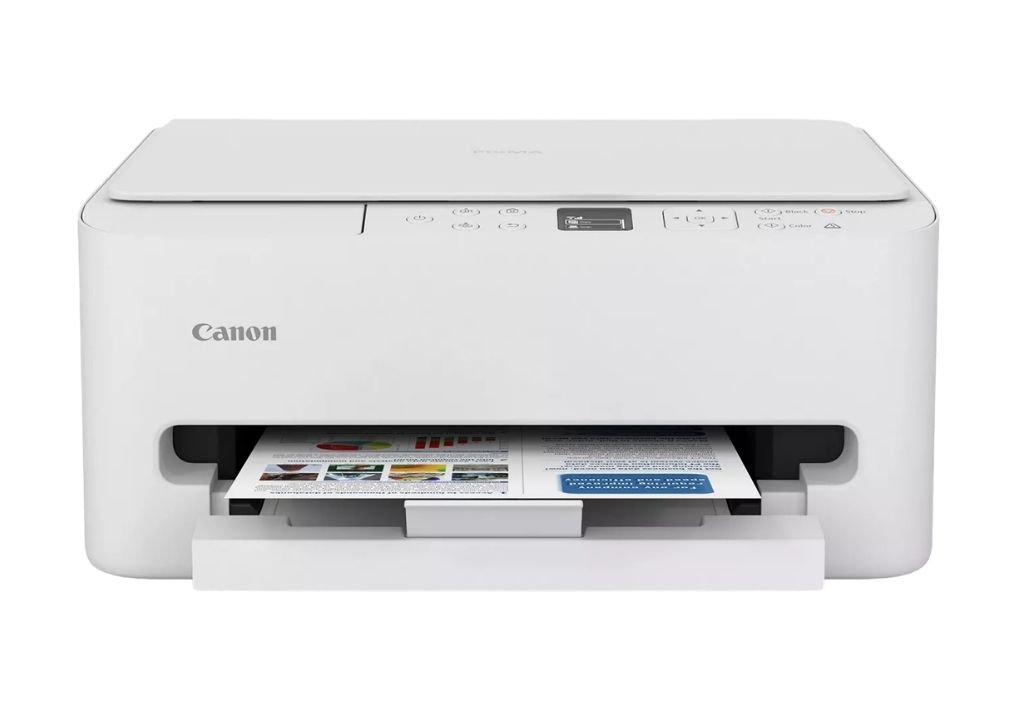
Canon PIXMA TS6520
Why We Recommend It
The Canon PIXMA TS6520 is one of the best budget all-in-one printers because it combines printing, copying, and scanning capabilities with strong photo quality and a very affordable purchase price.
Basic Specifications
- Print Speed: Up to 14 ipm black/ 9 ipm color
- Recommended Monthly Print Volume: Up to 500 pages
- Print Resolution: 1200 x 1200 dpi
- Base Model Dimensions (WxDxH): 14.8” x 14” x 6.7”
- Cost: Starting at around $80-$100 at Canon
Best For: Students, families, and home users who want an affordable printer for everyday documents and photos.
The PIXMA TS6520 uses Canon's hybrid ink system to produce sharp text and vibrant color output. It also supports automatic two-sided printing, helping reduce paper usage while making larger print jobs more convenient.
Wireless connectivity, mobile printing support, and a compact footprint make it easy to fit into almost any home workspace. Users can print, copy, and scan directly from compatible smartphones, tablets, and computers.
Its biggest limitation is that ink costs can add up over time for higher-volume users.
Xerox C410
Why We Recommend It
The Xerox C410 earns a spot on this list because it delivers performance typically found in much more expensive printers while remaining relatively affordable for small businesses and high-volume home offices.

Basic Specifications
- Print Speed: Up to 42 ppm
- Print Resolution: 1200 x 1200 dpi
- Recommended Monthly Print Volume: 10,000 pages
- Base Model Dimensions (WxDxH): 17.9” x 16.6” x 12.5”
- Base Model Weight: 45.3 pounds
- Cost: Starting at around $699 at Xerox
Best For: Small businesses, busy home offices, and users with higher print volumes.
The Xerox C410 is the fastest printer on this list, producing up to 42 pages per minute in both black and white and color. It also delivers excellent print quality with up to 1200 x 1200 dpi resolution and Xerox's enhanced color technology.
Built-in support for Apple AirPrint, Mopria, Wi-Fi Direct, and advanced security features make it easy to integrate into modern work environments. For organizations that print regularly, its recommended monthly volume of up to 10,000 pages helps justify the higher purchase price.
The primary downside is that it is a print-only device and costs more upfront than the other printers on this list.
Brother MFC-L2807DW
Why We Recommend It
The Brother MFC-L2807DW is one of the best budget monochrome all-in-one printers because it combines fast black-and-white printing, scanning, copying, and faxing into an affordable package.

Basic Specifications
- Print Speed: Up to 34 ppm
- Print Resolution: 1200 x 1200 dpi
- Recommended Monthly Print Volume: Up to 2,500 pages
- Base Model Dimensions (WxDxH): 16.1” x 15.7” x 12.5”
- Base Model Weight: 25.5 pounds
- Cost: Starting at around $280 at Brother
Best For: Home offices and small businesses that primarily print black-and-white documents.
The MFC-L2807DW offers strong value by combining multiple office functions into a single device. Fast print speeds and automatic duplex printing help improve productivity while keeping operating costs low.
Wireless connectivity and mobile printing support make it easy to print from a variety of devices, while the automatic document feeder adds convenience for scanning and copying multi-page documents.
Its biggest limitation is the lack of color printing.
Epson EcoTank ET-2850
Why We Recommend It
The Epson EcoTank ET-2850 is one of the most cost-effective printers to own because its refillable ink tank system dramatically reduces long-term supply costs.

Basic Specifications
- Print Speed: Up to 15.8 ppm black / 11 ppm color
- Print Resolution: Up to 4800 x 1200 dpi
- Functions: Print, Copy, Scan
- Base Model Dimensions (WxDxH): 17.2” x 23.5” x 8.1”
- Base Model Weight: 21.5 pounds
- Cost: Starting around $250 at Epson
Best For: Families and home users who print frequently and want to save money on ink.
Unlike traditional cartridge printers, the EcoTank ET-2850 uses refillable ink tanks that can produce thousands of pages before needing additional ink. This helps lower the overall cost per page compared to many entry-level printers.
The printer also includes wireless connectivity, automatic duplex printing, and all-in-one functionality, making it a versatile option for everyday home printing.
Its slower print speeds may be a drawback for users who regularly print larger jobs.
FAQ
What is the best budget printer in 2026?
The best budget printer depends on your needs. The HP OfficeJet Pro 9110b offers one of the best combinations of performance, features, and affordability, while the Canon PIXMA TS6520 is a strong choice for home users who need print, copy, and scan functionality.
Is it better to buy a cheap printer or a more expensive printer?
It depends on how much you print. Users with low print volumes can often save money with an inexpensive printer, while higher-volume users may benefit from investing in a printer with lower operating costs.
What printer has the lowest long-term cost?
Printers with refillable ink tanks, such as the Epson EcoTank ET-2850, often provide the lowest long-term cost per page.
Are inkjet printers or laser printers cheaper?
Inkjet printers typically cost less upfront, while laser printers often have lower operating costs over time due to higher-yield toner cartridges.
How do I choose the right budget printer?
Consider how often you print, whether you need color printing, if you need scanning or copying capabilities, and the long-term cost of replacement supplies.
Which Budget Printer Is Right for You?
While it’s tempting to opt for the cheapest printer when you have a tight budget, it’s important to pick a printer that delivers the features, reliability, and operating costs that make sense for your specific needs.
If you're primarily printing occasional documents at home, a model like the Canon PIXMA TS6520 may be all you need. If you print regularly for work, school, or business, investing in a printer with higher speeds and lower operating costs may save you money over time.
Beyond the sticker price, consider the total cost of ownership. A slightly more expensive printer can often provide better value in the long run, depending on factors like your print volume.
If you're still comparing options, our Product Configurator can help. You can explore Xerox printers, compare features side by side, and find a model that fits your budget, print volume, and workflow needs.
Ready to compare printers? Use our Product Configurator to find the Xerox printer that's right for your budget and printing requirements.
