 Skip to main content


“Move it to the cloud.”
If you’ve been in any IT or operations meeting in the last few years, you’ve probably heard that phrase more than once. Cloud tools promise flexibility, scalability, and easier access to all your files.
But is it the right solution for your business? The truth is, not every organization needs to rush into cloud document management. At least not without a plan.
At Strategic Technology Partners of Texas (STPT), we’ve worked with businesses at every stage of the document journey. We’ve taken them from paper-heavy environments to fully digital workflows. We’ve learned that the cloud can be powerful, but the right fit depends on your workflows, risk tolerance, and long-term goals.
In this guide, we’ll walk through when a cloud-based document management system makes sense, when it doesn’t, and how to evaluate your next move with confidence.
Table of Contents
- Should You Move Your DMS (Document Management System) to the Cloud?
- What Is a Cloud-Based Document Management System?
- Key Benefits of Cloud Document Management
- Potential Drawbacks to Consider
- How to Know If Your Document Strategy Is Cloud Ready
- Cloud vs. On-Premise Document Management
- How Cloud DMS Fits Into Digital Transformation
- Where Xerox Solutions Fit
- Key Takeaways
- Cloud Document Management FAQ
Should You Move Your DMS (Document Management System) to the Cloud?
A cloud-based document management system is a strong fit for organizations that need remote access, easier scalability, and reduced on-premise infrastructure. However, businesses with strict compliance requirements, heavy legacy dependencies, or limited connectivity should think carefully before switching.
The cloud can be the right solution, but it’s important to have the right timing and approach.
What Is a Cloud-Based Document Management System?
A cloud-based document management system (cloud DMS) is a platform that stores, organizes, secures, and manages business documents in a hosted environment rather than on local servers.
Instead of maintaining infrastructure in-house, your documents and workflows live in a secure cloud environment that users can access from approved devices and locations.
If you’re new to the category, start with our guide to “What Is a Document Management System (DMS)?”
In practical terms, a cloud DMS allows organizations to:
- Capture documents from scanners and applications
- Store files in centralized, searchable repositories
- Route documents through automated workflows
- Enforce permissions and retention policies
- Access information remotely
Key Benefits of Cloud Document Management
For many organizations, cloud-based systems solve real operational headaches.
Common advantages include:
Anywhere, Secure Access
Authorized users can retrieve documents from the office, home, or the field without relying on VPN-heavy workarounds.
Easier Scalability
Cloud platforms typically allow storage and user capacity to expand without purchasing new hardware.
Reduced IT Maintenance
Because the vendor manages updates and infrastructure, internal IT teams spend less time maintaining servers and patches.
Faster Deployment
Cloud environments often deploy more quickly than traditional on-premise systems.
Built-In Redundancy and Backup
Most enterprise cloud platforms include geographic redundancy and automated backup protections.
For organizations supporting hybrid work or multiple locations, these benefits can be significant.
Potential Drawbacks to Consider
A credible cloud strategy also means understanding the tradeoffs.
Cloud DMS may introduce challenges such as:
Data Residency and Compliance Questions
Highly regulated industries may require careful review of where data is stored and how it is governed.
Internet Dependency
Cloud access depends on reliable connectivity. Environments with unstable bandwidth may experience friction.
Change Management Requirements
Moving from familiar file shares or legacy systems can require user training and process adjustments.
Integration Complexity
Older line-of-business systems may require planning to integrate cleanly with cloud platforms.
Shared Responsibility for Security
Cloud vendors secure the infrastructure, but organizations still must manage user access, policies, and governance.
The cloud is powerful, but how successful it is for your business depends on thoughtful planning.
How to Know If Your Document Strategy Is Cloud Ready
Many businesses we speak with are interested in cloud tools but aren’t sure if the timing is right.
Your organization may be ready for a cloud DMS if you’re seeing:
- A growing remote or hybrid workforce
- Aging on-premise servers
- Files stored in boxes are forgotten, increasing storage demands.
- Manual, paper-heavy workflows
- IT teams stretched thin on maintenance
- Multiple locations needing shared access
If several of these sound familiar, your environment may benefit from cloud modernization.
For a deeper readiness checklist, see our guide: Is Your Document Strategy Cloud Ready?
Cloud vs. On-Premise Document Management
Both deployment models can work. The right choice depends on what you prioritize.
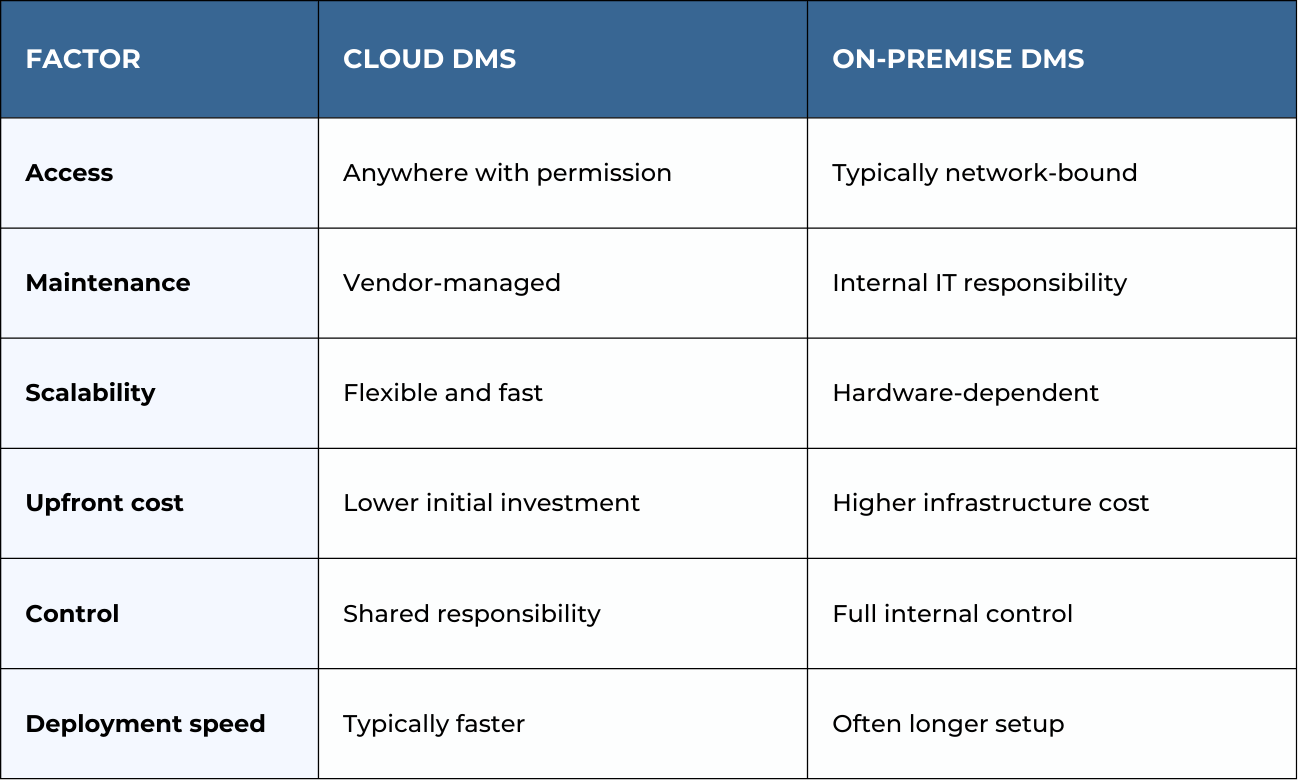
Many organizations today land somewhere in the middle with hybrid strategies.
How Cloud DMS Fits Into Digital Transformation
For many businesses, moving document workflows to the cloud is part of a broader modernization effort.
Cloud document management can help organizations:
- Reduce reliance on paper processes
- Enable remote work
- Improve workflow visibility
- Strengthen disaster recovery posture
- Prepare for automation and AI initiatives
If you’re evaluating the bigger picture, our guide “Moving to the Cloud: How to Get Started” walks through practical first steps and common pitfalls to avoid.
Where Xerox Solutions Fit
At STPT, we often see cloud document management initiatives intersect with Xerox’s digital ecosystem.
Depending on the environment, organizations may leverage:
- ConnectKey apps that scan directly to cloud repositories
- Xerox App Gallery solutions for cloud storage integration
- Xerox DocuShare for structured document workflows
- Managed print services to support hybrid environments
Explore the Ultimate Guide to Xerox Digital Services
Knowing your current workflows and goals will help you find the right architecture.
Key Takeaways
- Cloud document management offers flexibility, scalability, and reduced infrastructure burden.
- Not every organization should move immediately without evaluating compliance and workflow needs.
- Readiness depends on connectivity, security requirements, and process maturity.
- Many businesses adopt hybrid approaches during transition periods.
- A structured assessment helps ensure the move supports long-term goals.
Cloud Document Management FAQ
Is cloud document management secure?
Yes. Enterprise cloud platforms can be highly secure, but organizations must still manage user access, policies, and governance carefully.
Is cloud DMS cheaper than on-premise?
Often the upfront costs are lower, but the long-term total cost depends on storage growth, licensing, and infrastructure needs.
Can you migrate to the cloud gradually?
Yes. Many organizations use phased or hybrid approaches to reduce disruption and manage risk.
What industries benefit most from cloud DMS?
Organizations with distributed teams, multiple locations, or heavy document workflows often see the greatest benefit.
Not Sure If the Cloud Is the Right Move?
Every organization’s document environment is different. What works well for one business may create unnecessary risk or complexity for another.
If you’re evaluating whether a cloud document management system makes sense for your workflows, we’re happy to help you think it through.
Talk with an STPT workflow specialist for a practical, no-pressure assessment of your current environment and next best steps.
