 Skip to main content


Many organizations start researching CMS (content management systems) only to run into another acronym: DMS (document management system). These sound similar, but the truth is they solve very different business problems.
Not knowing the difference between a CSM and a DMS can lead to the wrong system choice, resulting in messy workflows, compliance gaps, and wasted budget. When you understand what each platform is built to do, the decision becomes much clearer.
In this guide, we’ll compare CMS vs. DMS so you can determine which system actually fits your environment.
Table of Contents
- CMS vs. DMS
- Side-by-Side Comparison Table
- What a CMS Is Designed to Do
- What a DMS Is Designed to Do
- When a CMS Is the Better Fit
- When a DMS Is the Better Fit
- Can One Platform Do Both?
- How to Choose Between CMS and DMS
- How Xerox DocuShare Fits Into the Picture
- Which System Is Right for Your Business?
- Frequently Asked Questions
CMS vs. DMS
A CMS manages collaborative content like web pages, videos, policies, and shared knowledge. A DMS manages controlled documents such as contracts, invoices, and regulated records. The right choice depends on whether your priority is collaboration or document control.
Side-by-Side Comparison: CMS vs. DMS
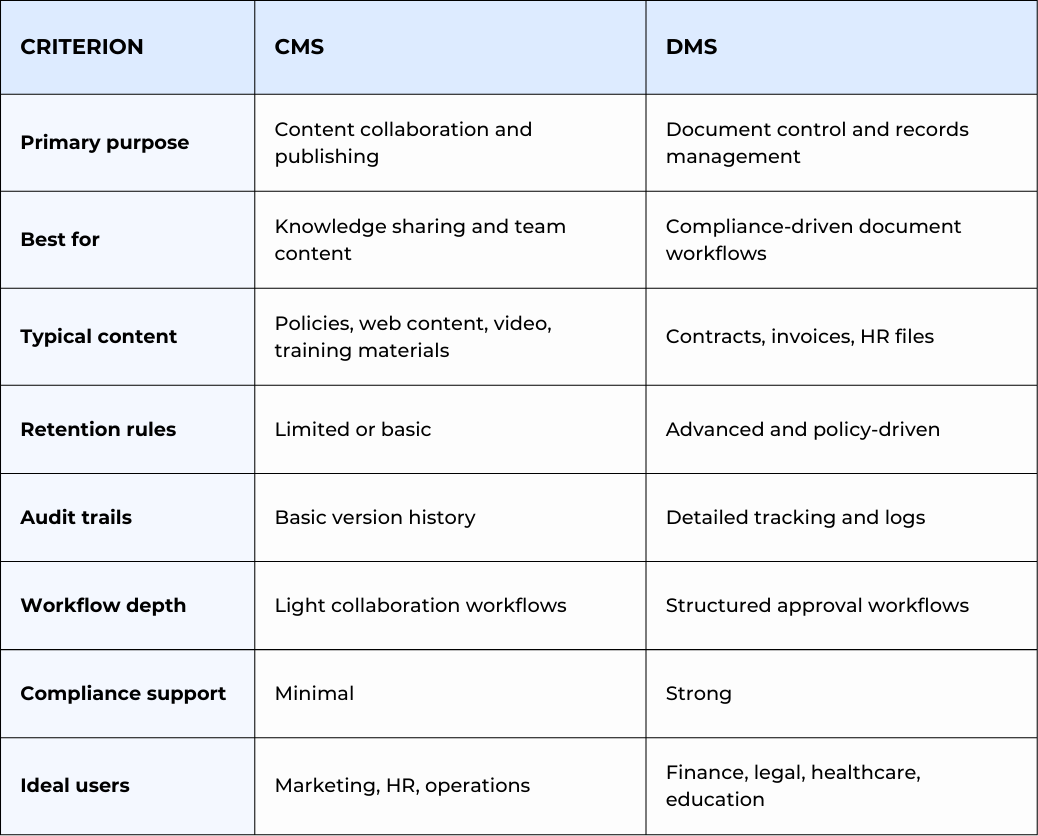
In short, CMS tools prioritize collaboration while DMS platforms prioritize control.
What a CMS Is Designed to Do
A Content Management System (CMS) is built to help teams create, organize, and share content in a centralized environment.
Its strength is accessibility and collaboration.
A CMS typically helps organizations:
- Maintain internal knowledge bases
- Share policies and procedures
- Support remote or hybrid teams
- Reduce duplicate content across departments
- Improve content searchability
CMS platforms such as Google Docs and Microsoft SharePoint make it easy to update, reference, and share information frequently across teams.
For a deeper breakdown, read our full guide: What Is a Content Management System?
What a DMS Is Designed to Do
A Document Management System (DMS) is built for structured document control across the entire lifecycle. It handles everything from capture to retention to secure disposal.
Its strength is governance and accountability.
A DMS typically helps organizations:
- Control sensitive business records
- Enforce retention policies
- Track document access and edits
- Automate approval workflows
- Support regulatory compliance
While a CMS helps teams collaborate, a DMS ensures documents are properly controlled, secured, and auditable.
To learn more, see our complete guide: What Is a Document Management System (DMS)?
When a CMS Is the Better Fit
A CMS is usually the right choice when your priority is organizing and sharing information across teams.
Choose a CMS if:
- Your priority is team collaboration
- Employees frequently co-edit content
- You manage knowledge bases or intranet content
- Compliance requirements are minimal
- You need fast publishing and updates
If your content needs organization, a CMS is often the first step.
When a DMS Is the Better Fit
A DMS is the better choice when your priorities are document control, compliance, and auditability rather than simple collaboration.
Choose a DMS if:
- You manage contracts, invoices, or HR records
- Documents require formal approval workflows
- Retention policies must be enforced
- You need detailed audit trails
- Regulatory compliance is a concern
If your biggest risk is document risk or compliance exposure, a DMS is usually the safer investment.
Can One Platform Do Both?
While CMS and DMS platforms traditionally serve different purposes, some modern solutions can support both collaboration and structured document control. This depends on how they’re configured.
Platforms like Xerox DocuShare are often used by organizations that need:
- Centralized content access
- Workflow automation
- Role-based security
- Records management capabilities
It helps to understand your primary needs today and how they may evolve over time.
How to Choose Between CMS and DMS
If you’re still unsure, ask yourself these four questions:
1. Do you need formal retention policies?
- Yes - Lean toward DMS
- No - CMS may be sufficient
2. Are documents part of regulated workflows?
- Yes - DMS is usually the safer choice
- No - CMS may work
3. Is collaboration your main priority?
- Yes - CMS is typically the better fit
- No - Consider DMS
4. Do you need detailed audit trails?
- Yes - DMS
- No - CMS may be enough
A quick way to decide:
If you prioritize collaboration, choose a CMS
If you prioritize control and compliance, choose a DMS
How Xerox DocuShare Fits Into the Picture
Many organizations we work with at STPT don’t start out knowing whether they need a CMS or a DMS. They just know their current document workflows feel inefficient or risky.
Xerox DocuShare can help businesses that need more than basic file sharing but aren’t ready for overly complex enterprise systems.
DocuShare can support:
- Secure document storage
- Workflow automation
- Role-based permissions
- Records management
- Integration with Xerox multifunction printers
Because of this flexibility, some organizations use DocuShare mainly for document management. Others prefer its collaboration capabilities as their environment matures.
The right fit depends on what your workflows, risk profile, and growth plans are.
Which System Is Right for Your Business?
If you’ve been trying to untangle the difference between CMS and DMS, you’re already asking the right questions. Most organizations don’t need every feature on day one, but they do need clarity on where their biggest risks and inefficiencies live.
At Strategic Technology Partners of Texas, we help businesses evaluate their document workflows, identify gaps, and determine whether a CMS, DMS, or hybrid approach makes the most sense.
Frequently Asked Questions
What is the main difference between CMS and DMS?
A CMS focuses on collaboration and shared content, while a DMS focuses on document control, compliance, and records management.
Can a CMS replace a DMS?
In most cases, no. A CMS typically lacks the advanced retention, audit, and compliance features that a true DMS provides.
Is Xerox DocuShare a CMS or DMS?
DocuShare is primarily a document management platform, but it can also support content collaboration depending on how it is configured.
Not sure whether you need a CMS or a DMS?
Talk with an STPT workflow specialist for a quick, no-pressure assessment of your current environment.
